With 3.3, we're focused on what happens when your agent configuration grows, with more guidelines, more relationships, more tools, more edge cases.
The features in this release make it easier to manage complexity at scale, and to push behavioral control into places that were previously out of reach.
The headline changes are tag-based relationships for managing groups of guidelines as a unit, numeric priorities for explicit ordering without verbose relationship declarations, and transient guidelines that let tools dynamically inject behavioral instructions into the agent's context.
We've also added Agent.utter() for programmatic message generation in long-running background tasks, and made it significantly easier to update customer and session metadata from within tools.
As your agent grows, you can accumulate a large number of guidelines.
Managing individual relationships between them (this guideline excludes that one, this one depends on that one) can potentially become tedious and fragile. For example, when adding a new compliance guideline, you have to remember to wire up all the right exclusions.
Tags relationships are a new way to solve this.
In 3.3, tags become first-class participants in the relationship system. You can define dependencies, exclusions, priorities, and reevaluation relationships at the tag level, and every guideline carrying that tag inherits the relationship automatically.
When you define a relationship on a tag, every guideline tagged with it gets the relationship:
compliance_guidelines =await server.create_tag("compliance-guidelines") redirect_off_topic =await agent.create_guideline( condition="The customer is asking about topics outside our scope", action="Redirect the conversation to our supported topics", tags=[compliance_guidelines], ) block_financial_advice =await agent.create_guideline( condition="The customer asks for personal financial advice", action="Explain that we cannot provide financial advice", tags=[compliance_guidelines], ) # All compliance guidelines take priority over casual conversation discussing_flights =await agent.create_observation( "The customer is discussing flights" ) await compliance_guidelines.prioritize_over(discussing_flights)
Now every compliance guideline (both existing and future ones) automatically takes priority over the flight discussion guideline. When you add a new compliance rule, you can just tag it, without manually wiring relationships.
Tags also work as relationship targets, letting you define relationships against an entire group:
upsell_guidelines =await server.create_tag("upsell-guidelines") offer_seat_upgrade =await agent.create_guideline( condition="The customer is booking a flight", action="Offer a seat upgrade", tags=[upsell_guidelines], ) offer_lounge_access =await agent.create_guideline( condition="The customer has a long layover", action="Offer lounge access", tags=[upsell_guidelines], ) # When the customer is upset, suppress ALL upsell guidelines at once customer_is_upset =await agent.create_observation( "The customer is frustrated or upset" ) await customer_is_upset.exclude(upsell_guidelines)
One relationship declaration suppresses an entire category of behavior. This is the kind of thing that previously required N individual exclusions (one for each upsell guideline) and partially broke every time you added a new one.
Tags also support reevaluation relationships with tools. When a tool fires, all guidelines carrying a tag with a reevaluation relationship to that tool are automatically re-evaluated:
balance_sensitive =await server.create_tag("balance-sensitive") await agent.create_guideline( condition="The customer's balance is below $500", action="Warn about potential overdraft fees", tags=[balance_sensitive], ) await agent.create_guideline( condition="The customer's balance exceeds $10,000", action="Suggest our premium savings account", tags=[balance_sensitive], ) # After checking the balance, re-evaluate all balance-sensitive guidelines await balance_sensitive.reevaluate_after(check_balance_tool)
Previously, you'd need to call reevaluate_after() on each individual guideline. With tag-based reevaluation, one declaration covers the whole group, and stays current as you add more guidelines to the tag.
Relationships like prioritize_over() and depend_on() are powerful, but they're verbose when you need to express a clear ordering across many guidelines.
Parlant 3.3 introduces a numeric priority property on guidelines and journeys. Higher priority means higher precedence. When multiple guidelines are matched, only those at the highest priority level end up active for the next turn of the conversation.
await agent.create_guideline( condition="Customer asks about pricing", action="Quote standard pricing", priority=0,# Default priority is 0 ) await agent.create_guideline( condition="Customer is an enterprise client", action="Quote enterprise pricing with volume discounts", priority=10, ) await agent.create_guideline( condition="Customer asks about a product under legal review", action="Explain that pricing is temporarily unavailable", priority=100, )
The relational resolver uses priority values during filtering: when conflicting guidelines are both matched, the lower-priority one is demoted. This works alongside explicit relationships — you can mix and match based on what's clearest for your configuration.
Priorities default to 0, so existing guidelines are unaffected. Journeys support the same property:
A clever trick that's made possible by priorities is the ability to prevent unguided responses from the agent.
By creating a catch-all guideline with a negative priority (lower than the default 0), you can ensure that the agent only responds when guidelines are active:
 await agent.create_guideline(
    matcher=p.MATCH_ALWAYS,
    action="You must say you can't help them right now",
    canned_responses=[
        await server.create_canned_response("Sorry, I cannot help!"),
    ],
    composition_mode=p.CompositionMode.STRICT,
    priority=-1,
)
Sometimes the right behavioral instruction doesn't exist at configuration time, like when a tool discovers, at runtime, how the agent should respond to a specific situation.
Transient guidelines let tools and retrievers inject behavioral guidelines into the agent's context dynamically. These guidelines are ephemeral: they apply only to the current response, then disappear. They don't persist in the session, and they don't affect future interactions.
@p.tool asyncdefcheck_order_status( context: p.ToolContext, order_id:str, )-> p.ToolResult: order =await orders_api.get(order_id) guidelines:list[p.TransientGuideline]=[] if order.status =="delayed": guidelines.append({ "action":"Apologize for the delay", }) if order.is_first_order: guidelines.append({ "action":"Thank the customer for their first purchase", }) return p.ToolResult( data=order.to_dict(), guidelines=guidelines, )
The guidelines returned here are injected into the agent's context alongside the statically defined ones. They participate in priority filtering, support criticality levels, and can include descriptions, just like regular guidelines.
This is useful when you need to react to situations that are too dynamic to predefine
Transient guidelines are a natural extension of how tools already return canned responses and fields. They add another dimension: tools can now influence not just what data the agent sees, but how it should behave in response to that data.
Real-world agents often need to speak without an incoming customer message triggering them to do so. For example, your agent might follow up on a background operation (like a flight booking), notify a customer about an event, or check in after a period of inactivity.
Agent.utter() enables programmatic message generation. You provide a session and a set of transient guidelines, and the agent generates a contextually appropriate message:
# Invoked asyncdeffollow_up_on_flight_booking(session: p.Session)->None: booking_id =await session.metadata.get("booking_id") status = booking_api.check_status(booking_id) if status =="confirmed": await agent.utter( session=session, guidelines=[ {"action":"Confirm their flight has been booked."}, ], ) else: ...
Managing session and customer state from within tools used to require working through the REST API. In 3.3, you can update metadata directly using the SDK's .current accessors.
@p.tool asyncdefclassify_inquiry(context: p.ToolContext)-> p.ToolResult: session = p.Session.current # Tag the session with metadata for analytics and routing await session.metadata.set("topic","billing") await session.metadata.set("priority","high") return p.ToolResult(data="Inquiry classified")
You can also update the session's mode (for human handoff) and transfer it to a different agent:
# Switch to manual mode await session.update(mode="manual") # Transfer to a specialist billing_agent =await p.Server.current.get_agent(id="billing_specialist") await session.update(agent=billing_agent)
This is especially useful for progressive profiling — building up customer context over the course of a conversation without leaving the tool execution scope.
Tag-based relationships let you manage behavior at the group level instead of wiring individual guidelines together.
Numeric priorities give you explicit ordering without verbose relationship declarations.
Transient guidelines let tools shape agent behavior at runtime, based on what they discover.
Agent.utter() makes your agent proactive.
Easier metadata management keeps your tools focused on business logic instead of API plumbing.
These features were shaped by feedback from teams running Parlant in production. As agents grow in complexity, the tools for managing that complexity need to grow with them. That's what 3.3 is about.
For two years, frontier model capability moved only incrementally on the benchmarks our field has been tracking. Yet, many developers attest that the experience of building with coding models improved dramatically.
If the models' pure benchmark performances hardly moved, what did..?
The answer is the emergence of the harness: a term for a specific layer of battle-tested engineering around a model. It has become the dominant determinant of what an LLM-powered system can actually do in production.
But what is a harness, exactly? Why has it become so crucial, and how hard is it to get right? And does it apply to agents other than Claude Code or Codex?
Claude Code is an example of a harness for coding workflows.
It's the layer that sits between a use case and Anthropic's models, which carefully controls what the underlying language model itself sees every time it's invoked, which tools it can use, how it plans, how it remembers, what it is allowed to assume, and when it should stop.
Importantly, none of this is the model itself. All of it shapes what the model does.
The foundation for the work a harness does is context engineering: getting the right tokens into the model's context, and, just as importantly, keeping any irrelevant ones out, at every step.
Why is this so crucial? Because when prompts are packed with everything that might be relevant, models degrade. The effect is not subtle and it is not specific to one model; it shows up in every frontier model across the board.
Even more interestingly, it doesn't matter so much whether the prompt is packed with either too little or too much of context. Models will degrade similarly, in both cases, to ungrounded, unaligned outputs.
Intuitively, you can think of it as managing attention for a human. There is such a thing as explaining too much in one breath: you lose the listener, and their execution of your instructions will suffer.
Critically,it turns out that the "right" context is also not constant across turns. It changes turn by turn, tool result by tool result, decision by decision.
This is why a model's context must be managed meticulously, continuously, and dynamically, from turn to turn.
GPT-4oLlama 3.3 70BClaude 3.5 Sonnet
From the NoLiMa benchmark (Modarressi et al., Adobe Research, 2025), which measured accuracy at increasing context lengths. Chroma's Context Rot study (2025) reproduces this across 18 models including Claude Opus 4 and GPT-4.1: at 32K tokens, 11 of 13 models drop to half their short-context performance.
A harness encompasses an opinionated workflow around an LLM.
It encodes how the agent should approach a class of work, and this structure is baked in at the framework level, so the agent does not have to rediscover it on every turn.
This is also the line between a harness and a toolkit. While the long tail of agent frameworks provide primitives which are useful, general, and intentionally unopinionated, a harness ships with battle-tested "opinions" about how to combine those primitives for a specific kind of work.
Toolkit frameworks let you build harnesses and workflows from scratch
Harness frameworks let you build business logic into battle-tested model workflows
As I said before, Claude Code is a harness for coding. Consider what it's actually doing, as understood from reverse-engineered reconstructions.
A constrained set of file operations (Read, Edit, Write, Grep) that force structured, controlled, and focused changes.
A TodoWrite tool that turns "the plan" into a first-class artifact the model maintains and is instructed to inspect as it works.
Hooks: shell commands that fire on tool events, so policy is enforced by code rather than by hope that the model re-reads its instructions.
A system prompt that is less a personality than a protocol: how to communicate with the user, when to ask, what counts as "done."
Critically, the power of these opinionated flows isn't achievable using a clever prompt, not even multi-agent orchestration (in its common, naive sense).
The harness is the sum of those flows, expressed with plenty of actual engineering around each and every LLM request. This sum is what produced the step-function in capability that the underlying model alone couldn't achieve.
If harnesses for coding agents works so well, what about other use cases?
Conversational agents, for example, make up in volume most of what enterprises actually want from LLMs: support agents, sales agents, scheduling agents, internal copilots, and business-aligned customer-facing chat.
The Surprising Challenge of Conversational Use Cases
On the surface, the work of coding agents seems far more complex than mere conversations. But, perhaps counter-intuitively, real-world conversations often present a drastically bigger challenge.
Conversational agents are still mostly built by engineers for someone else. This often means the requirements are harder to understand, and the dogfood loop around the implementation is weaker.
The development cycle in this projects is, in our experience, astonishingly common. When new edge cases appear in production, the workflow amounts to adding another instruction to one of the increasingly-larger system prompts.
The model seems to start handling that case correctly, but a week later, a different conversation that used to work has quietly broken, because the model is now over-applying the new instruction in places it does not belong.
The team then adds an exception, and then another. But as the prompt grows, the model's adherence to any given line of it gets worse. The team starts to dread making changes, and velocity and adaptability slow.
The shape of most conversational agent maintenance today
We built Parlant on the same insight that drove Claude Code: that the model is not the bottleneck, and the gains from re-shaping what the model sees are much larger than the gains from waiting for the next model.
The opinions we have baked into Parlant's workflow are different, because the work is different. A conversational agent does not edit files. It maintains a coherent, aligned, and predictable interaction over many turns.
It applies a dynamic set of business rules to a moving conversation. It is judged not on whether the code compiles, but on whether customers are handled correctly and consistently.
To our knowledge, Parlant is the first complex, open system that treats a conversational agent as a full harness in this sense, rather than a prompt with tools attached. An agent does not run as a single LLM call. It runs as a pipeline of narrow stages, each of which gets exactly the context it needs:
Guideline matching. Narrowing down the behavioral rules that govern an agent (what to do, what to avoid, what policies to apply) to the small subset that actually applies to this point in this conversation. The model never sees the rules that do not matter right now and, as a result, is far more consistent at applying its provided rules. This is similar to skills in coding agents.
Trigger-based tool calling. Instead of presenting the model with a large tool library and hoping it picks the right ones, Parlant's pipeline triggers the evaluation of only specific tools at each turn, based on the conversation's state and the matched guidelines.
Canned responses. For moments where the team needs to control exactly what the agent says, such as disclosures, scripted offers, and specific phrasings legal has signed off on, the harness can bypass generation entirely and select a pre-approved template. The model's job, in those high-stakes moments, focuses on correct selection rather than composition.
Full traceability. Every decision the pipeline makes (which guidelines fired, which tools were considered, which response was selected and why) benefits from the underlying structured approach, and is logged end-to-end. A conversation can be replayed and inspected the way an engineer would step through a debugger, seeing exactly how specific instructions affected the model's output at a particular turn of a conversation.
Each stage runs on a small, focused prompt. Nothing in the turn's execution pipeline depends on the model holding the entire rulebook or tools in mind at once.
It would be misleading to suggest the shift is free. While a good harness dramatically improves results, it costs more than a system prompt in two respects.
First, it costs more tokens, because pipelined stages send more API calls than one large one.
Second, it may cost more in latency, because more stages mean more sequential work.
In our experience (and many happy Parlant users), the trade is overwhelmingly worth it once an agent is being asked to do anything serious: anything where reliability, compliance, or debuggability matter more than time-to-prototype.
But it is a trade. A weekend prototype does not need a harness, whereas an agent that interfaces directly with customers often cannot be built without one.
It is also worth saying: harness work is not a one-off situation. Coding harnesses are still actively evolving. While we have strong opinions about the trade-offs Parlant makes, our team constantly searches for ways to improve every aspect of both the developer and user experience.
In our opinion, that is just what real engineering looks like!
We do not think the next few years of LLM progress will be won at the model layer alone. The harness level is where the most exciting and impactful work will be done, and where the biggest leaps in capability will be seen.
Frontier models will keep improving, slowly, probably expensively, in increments. The applied gap between "raw model" and "model in a thoughtful harness" is already large, and we expect it to keep widening. Claude Code made this concrete for engineering.
We believe the same proof is on its way for every other domain in which language models do real work.
If you are building a conversational agent for a real business, the question is no longer "which model should I use?" It is "what is my harness, and what opinions does it encode?" If the answer is "a system prompt and some tools," there may be a step-function on the table that has not yet been picked up.
The frame that matters here is not "buy a framework" or "build your own." It's the recognition that conversational agents, like coding agents, are systems whose value comes from the workflow around the model, not from the model alone.
With 3.3, we're focused on what happens when your agent configuration grows, with more guidelines, more relationships, more tools, more edge cases.
The features in this release make it easier to manage complexity at scale, and to push behavioral control into places that were previously out of reach.
The headline changes are tag-based relationships for managing groups of guidelines as a unit, numeric priorities for explicit ordering without verbose relationship declarations, and transient guidelines that let tools dynamically inject behavioral instructions into the agent's context.
We've also added Agent.utter() for programmatic message generation in long-running background tasks, and made it significantly easier to update customer and session metadata from within tools.
As your agent grows, you can accumulate a large number of guidelines.
Managing individual relationships between them (this guideline excludes that one, this one depends on that one) can potentially become tedious and fragile. For example, when adding a new compliance guideline, you have to remember to wire up all the right exclusions.
Tags relationships are a new way to solve this.
In 3.3, tags become first-class participants in the relationship system. You can define dependencies, exclusions, priorities, and reevaluation relationships at the tag level, and every guideline carrying that tag inherits the relationship automatically.
When you define a relationship on a tag, every guideline tagged with it gets the relationship:
compliance_guidelines =await server.create_tag("compliance-guidelines") redirect_off_topic =await agent.create_guideline( condition="The customer is asking about topics outside our scope", action="Redirect the conversation to our supported topics", tags=[compliance_guidelines], ) block_financial_advice =await agent.create_guideline( condition="The customer asks for personal financial advice", action="Explain that we cannot provide financial advice", tags=[compliance_guidelines], ) # All compliance guidelines take priority over casual conversation discussing_flights =await agent.create_observation( "The customer is discussing flights" ) await compliance_guidelines.prioritize_over(discussing_flights)
Now every compliance guideline (both existing and future ones) automatically takes priority over the flight discussion guideline. When you add a new compliance rule, you can just tag it, without manually wiring relationships.
Tags also work as relationship targets, letting you define relationships against an entire group:
upsell_guidelines =await server.create_tag("upsell-guidelines") offer_seat_upgrade =await agent.create_guideline( condition="The customer is booking a flight", action="Offer a seat upgrade", tags=[upsell_guidelines], ) offer_lounge_access =await agent.create_guideline( condition="The customer has a long layover", action="Offer lounge access", tags=[upsell_guidelines], ) # When the customer is upset, suppress ALL upsell guidelines at once customer_is_upset =await agent.create_observation( "The customer is frustrated or upset" ) await customer_is_upset.exclude(upsell_guidelines)
One relationship declaration suppresses an entire category of behavior. This is the kind of thing that previously required N individual exclusions (one for each upsell guideline) and partially broke every time you added a new one.
Tags also support reevaluation relationships with tools. When a tool fires, all guidelines carrying a tag with a reevaluation relationship to that tool are automatically re-evaluated:
balance_sensitive =await server.create_tag("balance-sensitive") await agent.create_guideline( condition="The customer's balance is below $500", action="Warn about potential overdraft fees", tags=[balance_sensitive], ) await agent.create_guideline( condition="The customer's balance exceeds $10,000", action="Suggest our premium savings account", tags=[balance_sensitive], ) # After checking the balance, re-evaluate all balance-sensitive guidelines await balance_sensitive.reevaluate_after(check_balance_tool)
Previously, you'd need to call reevaluate_after() on each individual guideline. With tag-based reevaluation, one declaration covers the whole group, and stays current as you add more guidelines to the tag.
Relationships like prioritize_over() and depend_on() are powerful, but they're verbose when you need to express a clear ordering across many guidelines.
Parlant 3.3 introduces a numeric priority property on guidelines and journeys. Higher priority means higher precedence. When multiple guidelines are matched, only those at the highest priority level end up active for the next turn of the conversation.
await agent.create_guideline( condition="Customer asks about pricing", action="Quote standard pricing", priority=0,# Default priority is 0 ) await agent.create_guideline( condition="Customer is an enterprise client", action="Quote enterprise pricing with volume discounts", priority=10, ) await agent.create_guideline( condition="Customer asks about a product under legal review", action="Explain that pricing is temporarily unavailable", priority=100, )
The relational resolver uses priority values during filtering: when conflicting guidelines are both matched, the lower-priority one is demoted. This works alongside explicit relationships — you can mix and match based on what's clearest for your configuration.
Priorities default to 0, so existing guidelines are unaffected. Journeys support the same property:
A clever trick that's made possible by priorities is the ability to prevent unguided responses from the agent.
By creating a catch-all guideline with a negative priority (lower than the default 0), you can ensure that the agent only responds when guidelines are active:
 await agent.create_guideline(
    matcher=p.MATCH_ALWAYS,
    action="You must say you can't help them right now",
    canned_responses=[
        await server.create_canned_response("Sorry, I cannot help!"),
    ],
    composition_mode=p.CompositionMode.STRICT,
    priority=-1,
)
Sometimes the right behavioral instruction doesn't exist at configuration time, like when a tool discovers, at runtime, how the agent should respond to a specific situation.
Transient guidelines let tools and retrievers inject behavioral guidelines into the agent's context dynamically. These guidelines are ephemeral: they apply only to the current response, then disappear. They don't persist in the session, and they don't affect future interactions.
@p.tool asyncdefcheck_order_status( context: p.ToolContext, order_id:str, )-> p.ToolResult: order =await orders_api.get(order_id) guidelines:list[p.TransientGuideline]=[] if order.status =="delayed": guidelines.append({ "action":"Apologize for the delay", }) if order.is_first_order: guidelines.append({ "action":"Thank the customer for their first purchase", }) return p.ToolResult( data=order.to_dict(), guidelines=guidelines, )
The guidelines returned here are injected into the agent's context alongside the statically defined ones. They participate in priority filtering, support criticality levels, and can include descriptions, just like regular guidelines.
This is useful when you need to react to situations that are too dynamic to predefine
Transient guidelines are a natural extension of how tools already return canned responses and fields. They add another dimension: tools can now influence not just what data the agent sees, but how it should behave in response to that data.
Real-world agents often need to speak without an incoming customer message triggering them to do so. For example, your agent might follow up on a background operation (like a flight booking), notify a customer about an event, or check in after a period of inactivity.
Agent.utter() enables programmatic message generation. You provide a session and a set of transient guidelines, and the agent generates a contextually appropriate message:
# Invoked asyncdeffollow_up_on_flight_booking(session: p.Session)->None: booking_id =await session.metadata.get("booking_id") status = booking_api.check_status(booking_id) if status =="confirmed": await agent.utter( session=session, guidelines=[ {"action":"Confirm their flight has been booked."}, ], ) else: ...
Managing session and customer state from within tools used to require working through the REST API. In 3.3, you can update metadata directly using the SDK's .current accessors.
@p.tool asyncdefclassify_inquiry(context: p.ToolContext)-> p.ToolResult: session = p.Session.current # Tag the session with metadata for analytics and routing await session.metadata.set("topic","billing") await session.metadata.set("priority","high") return p.ToolResult(data="Inquiry classified")
You can also update the session's mode (for human handoff) and transfer it to a different agent:
# Switch to manual mode await session.update(mode="manual") # Transfer to a specialist billing_agent =await p.Server.current.get_agent(id="billing_specialist") await session.update(agent=billing_agent)
This is especially useful for progressive profiling — building up customer context over the course of a conversation without leaving the tool execution scope.
Tag-based relationships let you manage behavior at the group level instead of wiring individual guidelines together.
Numeric priorities give you explicit ordering without verbose relationship declarations.
Transient guidelines let tools shape agent behavior at runtime, based on what they discover.
Agent.utter() makes your agent proactive.
Easier metadata management keeps your tools focused on business logic instead of API plumbing.
These features were shaped by feedback from teams running Parlant in production. As agents grow in complexity, the tools for managing that complexity need to grow with them. That's what 3.3 is about.
Parlant has always been about control: giving you the ability to shape agent behavior precisely and reliably. Version 3.1 deepened that control with criticality levels, custom matchers, event handlers, and observability.
With 3.2, we've taken important steps to enhance user experience: not only in improving the UX itself, but also in making it easier to monitor and analyze your agent's interactions with your users.
We've heard from teams running Parlant in production that while behavioral accuracy is critical, perceived responsiveness and operational visibility matter just as much for adoption. This release is shaped by that feedback.
The headline change is streaming message output — responses that arrive token by token instead of as a single block. We've also added a built-in ability to categorize and track interaction sessions, along with deeper per-agent personality configuration, easier granular control of knowledge retrieval and context management, tighter control around canned response selection, and a collection of other fixes and improvements.
First, let's discuss the customer-facing improvements. Parlant 3.2 includes two major features that directly impact the user experience: streaming responses and enhanced agent personality configuration.
When a customer sends a message, your agent matches guidelines, calls tools, assembles context, and finally generates a response message.
Parlant goes through hoops to improve UX during the context assembly stage (with responsive status indicators and preamble messages), but the message generation part can also take a few seconds, and this has thus far remained unaddressed.
During message generation, the customer only saw a "typing" indicator.
For short replies, that's fine. But for agents that produce longer responses, the wait creates a gap that can feel unnatural.
The method of streaming (watching text appear word by word) often feels more responsive. It also lends itself better to voice agents, since the voice response can start generating and playing as soon as the first tokens are generated, rather than waiting for the full message to be ready.
Parlant 3.2's new streaming output mode finally closes this gap:
agent =await server.create_agent( name="Support Agent", description="Handles customer inquiries", # New parameter to control response delivery output_mode=p.OutputMode.STREAM, )
You configure the output mode per agent. We recommend streaming for customer-facing agents where perceived responsiveness matters.
info
When using canned responses, the agent will still revert to block output mode, even when streaming is enabled. This is useful when using dynamic composition mode, where only certain conditions trigger the use of canned responses, and the agent is left to operate in fluid mode for the rest of the time.
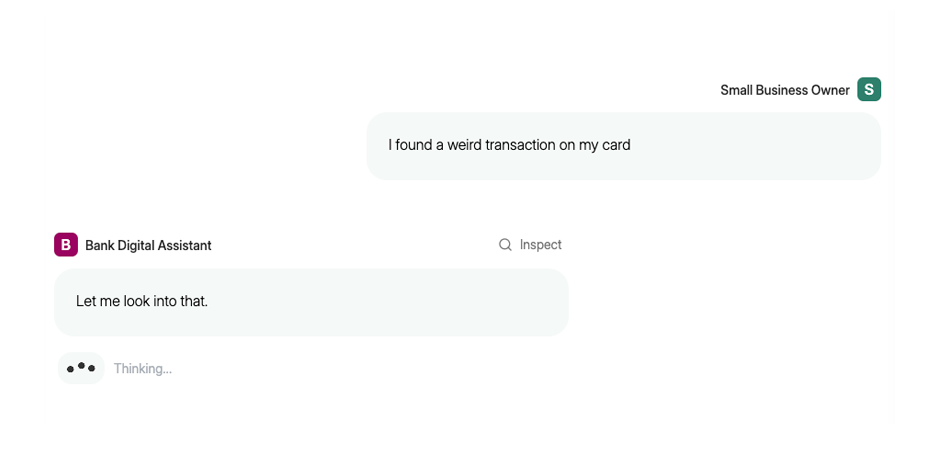
Preambles are the quick acknowledgment messages — like "Got it" or "Let me check that" — that Parlant sends while processing a response, to keep the user engaged.
However, as different agents have different personalities, in 3.2, you can customize preamble behavior per agent, with concrete examples.
preamble_config = p.PreambleConfiguration( examples=["Understood.","Let me look into that.","One moment."], )
You can also provide dynamic instructions to the preamble generator, so the preambles can adjust to the situation.
preamble_config = p.PreambleConfiguration( examples=["Understood.","Let me look into that.","One moment."], get_instructions=my_instruction_provider, )
The get_instructions callable receives an EngineContext, which gives you access to the current state of the session — matched guidelines, active journeys, customer information, and conversation history. You can use this to tailor the preamble generation to the situation at hand:
asyncdefmy_instruction_provider(ctx: p.EngineContext)-> Sequence[str]: instructions =[] # Check the time of day for the customer hour = datetime.now().hour if hour <12: instructions.append("Use a morning greeting like 'Good morning'.") elif hour >=18: instructions.append("Use an evening greeting like 'Good evening'.") return instructions
This way, the same agent can adjust its preamble tone based on context — time-aware greetings, or any other signal you can derive from the session state.
One of the things that continues to surprise even ourselves about Parlant's architecture is how much you can build on top of Parlant's fundamental design decision: that guidelines and journeys are individual, well-defined units.
When you know exactly which instruction got activated and when, that opens doors you didn't plan for. Labels are a good example.
You can now set labels directly on guidelines, journeys, and journey states. Simple string tags. What does this enable?
Labels from these control primitives propagate into the session. Whenever a guideline matches, the session gets stamped with that guideline's labels. The same applies to journeys and journey states.
Over the course of a conversation, the session picks up relevant labels — giving you a record of what was activated and when.
await agent.create_guideline(
    condition="The agent sees an opportunity to recommend a premium plan",
    action="Suggest the premium plan and explain its benefits",
    labels=["upsell_attempt"],
)

await agent.create_guideline(
    condition="The customer is frustrated and wants to speak to a human",
    action="Transfer the conversation to a human agent",
    tools=[human_handoff],
    labels=["human_handoff"],
)
Now imagine you need to run analytics or filter sessions. With labels, you can pull up all sessions where an upsell was attempted, and examine them closely to understand how customers responded and optimize the interaction.
For example, if you have a human_handoff label, you can quickly surface every session where escalation occurred and investigate why.
And you can apply labels to journeys and states as well, not just guidelines.
Querying by labels is built into the client SDKs. For example, using parlant-client in TypeScript, you can filter sessions by one or more labels:
As you may already know, Parlant, by default, tracks whether your agent has already applied a guideline's action and deactivates it to prevent repetition, even the condition is still met when looked at in its own right.
Usually, this is exactly what you want. You don't want the agent explaining the return policy five times in one conversation.
But not all actionable guidelines are one-time actions. Some are ongoing behavioral cues — tone adjustments, empathy responses, compliance reminders — that should apply every time their condition is met. For these, the default tracking may sometimes get in the way.
The new track parameter gives you explicit control on whether to enable it:
# Default: tracked, applies once per context await agent.create_guideline( condition="Customer asks about pricing", action="Provide current pricing", track=True,# default ) # Untracked: reapplies every time the condition matches await agent.create_guideline( condition="Customer expresses frustration", action="Acknowledge their frustration and offer help", track=False, )
Setting track=False bypasses the "previously applied" analysis entirely, so that your agent continually keeps this guideline in mind while the condition applies.
In 3.1, retrievers were attached at the agent level and ran on every interaction. This works, but we found it leads to unnecessary context pollution in practice — pricing docs get retrieved during a password reset, troubleshooting articles load during a billing inquiry.
It was always possible to work around this using deferred retrievers, but it was something of an advanced usage pattern. So in 3.2, we've made this common pattern simpler to use.
You can now scope retrievers to specific guidelines or journeys. They only activate when the associated entity matches:
asyncdeffetch_pricing_docs(ctx: p.RetrieverContext)-> p.RetrieverResult: docs =await pricing_db.search(ctx.interaction.last_customer_message) return p.RetrieverResult(data=docs) pricing_guideline =await agent.create_guideline( condition="Customer asks about pricing", action="Provide pricing based on their plan", ) await pricing_guideline.attach_retriever(fetch_pricing_docs)
The same works for journeys and journey states: they all now support .attach_retriever().
The result is a cleaner context window and fewer wasted retriever calls. If the pricing guideline doesn't match, the pricing docs simply aren't fetched.
This approach trades some flexibility for precision. Agent-level retrievers remain the right choice when data is broadly useful across many guidelines. Scoped retrievers work best when data is clearly tied to a specific guideline or journey.
Canned responses often reference dynamic data through template fields — {{order_status}}, {{delivery_date}}. Until now, there was no explicit way to express that a response requires those fields to be available, aside from actually referencing them in the response.
Field dependencies make this explicit, so you can condition the engine's selection of canned responses on the presence of specific fields in the context, even without your response referencing them directly:
await agent.create_canned_response(
    template="Yay, your order is confirmed!",
    field_dependencies=["new_order_id"],
)
With this declaration, the engine only considers the response when both fields are available from an active tool or retriever. If the data isn't there, it filters the response out early.
This matters most in strict composition mode, where your agent must use a canned response. Field dependencies prevent the engine from selecting a response it can't fully render — and, consequently, from saying something it definitely shouldn't, like claiming something happened when it didn't.
Streaming responses and per-agent personality make your agent feel present. Labels give you visibility into what's actually happening across conversations. Scoped retrievers, field dependencies, and lifecycle hooks tighten the feedback loop between what you observe and what you configure.
Many of the features in this release came directly from conversations with teams building agents at scale. We're grateful to everyone who contributed feedback, reported issues, and shared their production experiences — this release is better because of it.
Parlant has always been about control: giving you the ability to shape agent behavior precisely, reliably, and at scale.
Version 3.1 takes this further by adding granular control mechanisms across every layer of the framework.
This release introduces criticality levels for guidelines, custom matchers that let you override default matching logic, event handlers for guidelines and journey states, linked journeys for modular flow composition, dynamic composition mode overrides, and field providers that extend canned response capabilities.
Each of these features gives you finer control over how your agent behaves in specific situations.
Alongside these framework improvements, we're also launching Emcie, our first commercial offering: an auto-optimizing inference platform for teams looking to reduce operational costs while maintaining response accuracy.
We've worked closely with the community over the past 4 months to build on the foundation of version 3.0. Let's dive into the details.
As Parlant agents scale, there's a natural opportunity to optimize inference costs without compromising accuracy. Large language models deliver excellent results, but smaller models can often achieve comparable performance for specific, well-defined tasks once they're tuned for the job.
Incidentally, Parlant's architecture lends itself perfectly to SLM distillation, since each NLP task (guideline matching, tool calling, message generation) can be optimized independently.
We're super excited to introduce Emcie: our new auto-optimizing inference platform for Parlant agents. It automatically reduces operational costs through dynamic prompt tuning and SLM distillation, while maintaining the accuracy your agents need. Learn more at emcie.co.
With that, let's explore the key improvements in Parlant 3.1!
You can now link journeys together by transitioning to another journey from within a state. This allows you to create modular, reusable journeys that compose into larger flows.
t =await state.transition_to(journey=payment_journey)
t =await state.transition_to( condition="Customer wants to pay now", journey=payment_journey, )
When you transition to a journey, the sub-journey's states are embedded into the parent journey. The transition returns a JourneyTransition whose .target is a fork state, letting you continue building the flow after the sub-journey completes.
This is useful for separating concerns: a checkout journey can link to a payment journey, which can link to a receipt journey, each maintained independently.
Both journey states and guidelines now support a description field for elaboration. This is useful when a condition or action requires clarification, or when experimentation reveals that the agent isn't interpreting things correctly.
t =await state.transition_to( chat_state="Confirm the booking details", description="""At this point, summarize all collected information: destination, dates, number of travelers, and selected flight options. Ask the customer to verify everything is correct before proceeding.""" )
await agent.create_guideline(
    condition="The customer mentions a competitor product",
    action="Acknowledge their experience and highlight our differentiators",
    description="""Be respectful of competitor products while emphasizing
our unique value. Never disparage competitors directly. Focus on features
like our 24/7 support and flexible pricing."""
)
The description is included in the agent's context when the guideline or state is active, improving both matching accuracy and the agent's ability to follow the instruction correctly.
As we expanded on in our recent blog post, not all instructions carry the same weight. A compliance disclosure has different stakes than a greeting preference. Parlant 3.1 introduces criticality levels that let you specify how much effort the engine should spend ensuring conformance.
Level
Behavior
Use Case
HIGH
Full ARQ-based enforcement; maximum resources allocated
await agent.create_guideline(
    condition="Customer asks about cancellation fees",
    action="Disclose the $50 cancellation fee before proceeding",
    criticality=p.Criticality.HIGH
)

await agent.create_guideline(
    condition="The conversation has just started",
    action="Inquire if they want to hear about on-sale items",
    criticality=p.Criticality.LOW
)
Low-criticality guidelines use a more efficient matching path, reducing compute costs for agents that make significant use of them. High-criticality guidelines always receive full ARQ-based matching and enforcement.
You can now register handlers that execute when a guideline or journey state is matched. This is useful for logging, analytics, or external integrations.
The on_match handler runs immediately after matching, before the agent generates its response:
Journeys now support transitioning through multiple consecutive tool states. This is useful for workflows that require several tool calls in sequence before presenting results to the customer.
Tools can now be marked as consequential or non-consequential. Consequential tools have side effects that require careful evaluation before execution. Non-consequential tools are read-only or easily reversible.
@p.tool# Non-consequential by default asyncdefget_order_status( context: p.ToolContext, order_id:str )-> p.ToolResult: status =await orders_api.get_status(order_id) return p.ToolResult(data=status) @p.tool(consequential=True) asyncdefprocess_refund( context: p.ToolContext, order_id:str )-> p.ToolResult: result =await payments_api.refund(order_id) return p.ToolResult(data=result)
For non-consequential tools, Parlant optimizes for speed. Tools with no parameters run instantly without evaluation overhead. Tools with parameters use a faster evaluation path.
For consequential tools, Parlant applies full validation before execution.
We've restructured the tool evaluation pipeline to avoid unnecessary evaluation steps. In certain response cases, this saves up to 15 seconds of latency. The improvement is most noticeable for agents with many tools where only a subset applies to any given context.
Retrievers typically run early in the pipeline, in parallel with guideline matching. This is optimal for latency, but sometimes you want to decide whether to include retriever results based on which guidelines actually matched.
Deferred retrievers solve this by returning a callable instead of a direct result:
asyncdefconditional_retriever( ctx: p.RetrieverContext )-> p.DeferredRetriever: # Runs early, in parallel with guideline matching documents =await fetch_documents(ctx.interaction.last_customer_message) asyncdefdeferred(engine_ctx: p.EngineContext)-> p.RetrieverResult: matched_ids ={g.idfor g in engine_ctx.state.guidelines} if MY_GUIDELINE_ID in matched_ids: return p.RetrieverResult(data=documents) returnNone# Skip adding data return deferred await agent.attach_retriever(conditional_retriever)
This gives you parallel execution for the retrieval work while allowing context-aware filtering after guideline matching completes.
Canned responses provide precise control over agent outputs, eliminating hallucination risk in high-stakes interactions. In Parlant 3.1, we've added several awesome enhancements.
You can now associate canned responses directly with guidelines or journey states. These responses receive elevated consideration when the guideline is matched or the journey state is active.
await agent.create_guideline(
    condition="Customer asks about refund policy",
    action="Explain the refund policy",
    canned_responses=[
        await server.create_canned_response(
            template="We offer full refunds within 30 days of purchase.",
        ),
    ]
)
The choice of creating them with the server or agent object matters: responses created via server are only considered when their associated guideline or state is active, while responses created via agent are always available but receive elevated priority when the association is active.
While agents have a default composition mode (Fluid, Composited, or Strict), you can now override it temporarily based on active guidelines, journeys, or journey state transitions.
await agent.create_guideline(
    condition="The customer is discussing off-topic subjects",
    action="Explain you can only assist with account-related issues",
    composition_mode=p.CompositionMode.STRICT,
    canned_responses=[
        await agent.create_canned_response(
            template="I'm here to help with your account. Could we focus on that?"
        ),
    ]
)
t =await state.transition_to( chat_state="Confirm payment details", composition_mode=p.CompositionMode.STRICT, )
When multiple composition modes are active, the most restrictive wins: STRICT > COMPOSITED > FLUID. This lets you maintain a flexible agent overall while enforcing strict control in high-stakes situations.
Canned responses can now include metadata that passes through to the frontend without being visible to the agent:
await agent.create_canned_response( template="Here are your recommendations: {{recommendations}}", metadata={ "reply_suggestions":[ "Tell me more", "Show alternatives", "Add to cart" ], }, )
When this response is selected, the metadata is included in the response event, allowing your frontend to access it. This is useful for sending UI hints, reply suggestions, or other frontend-specific data alongside the response.
Field Providers for Guidelines and Journey States
Guidelines and journey states can now provide fields for canned response templates, similar to how tools provide fields:
asyncdefprovide_discount_code(ctx: p.EngineContext)->dict[str, Any]: code =await generate_discount_code(ctx.customer.id) return{"discount_code": code} await agent.create_guideline( condition="Customer asks about available discounts", action="Offer them a personalized discount", canned_response_field_provider=provide_discount_code, )
await agent.create_canned_response(
    template="Here's your discount code: {{discount_code}}"
)
The OpenTelemetry integration works with any compatible backend: Jaeger, Grafana, Datadog, Honeycomb, and others. Each event in a session includes a trace_id field for correlating telemetry data with specific responses.
The configure_api hook gives you access to the underlying FastAPI instance. This allows adding custom endpoints, middleware, or other extensions for your deployment.
Parlant 3.1 represents months of work informed by real-world production feedback. Many of the features in this release came directly from conversations with teams building agents at scale.
We're grateful to everyone who shared their experiences, reported issues, and contributed ideas.
If you're new to Parlant, there's never been a better time to get started. If you're already using it, we hope these improvements make your agents more capable and your development workflow smoother.
Ensuring that LLM-based agents reliably follow instructions requires computational overhead. As I've written before, performing this task at a production-grade level involves sophisticated matching procedures that may end up consuming considerable resources.
As a rule, the more reliably you want your agent to behave, the more you generally find yourself paying for compute.
However, precisely when it comes to costs, there's another curious facet to this problem, which opens up opportunities for additional optimization: Not all instructions carry the same weight within a particular scope or use case.
Consider two guidelines for a support agent:
"When handling refunds, first check for order eligibility"
"When greeting the customer, use their first name"
Both are instructions. But should your agent invest the same level of compute resources to ensure adherence to both? While the first could create legal liability if violated, the second—at worst—makes the conversation slightly less personable.
This is where the concept of instruction criticality comes in. The idea is to convey to your agent which instructions matter more, so it can allocate resources proportionally.
This article explores the challenges of instruction prioritization, and introduces Parlant 3.1's upcoming framework-level solution.
The arguably intuitive approach to the problem of criticality seems straightforward: just tell the LLM which instructions are more important. For example, you can emphasize them using capital letters, listing them under special sections, or prefixing them with criticality qualifiers (e.g., "IMPORTANT: ...").
Unfortunately, the reliability of such approaches is limited.
For example, a February 2025 study titled Control Illusion tested one particularly interesting aspect of this problem across six state-of-the-art models. It looked at six types of programmatically verifiable output constraints, which the LLM was instructed to adhere to. The instructions dealt with relatively simple constraints, such as language choice, capitalization, word count, sentence count, and keyword inclusion.
First, instructions were tested independently. Then they were tested in conflicting pairs where the higher-priority system prompt specified one requirement and the lower-priority user message specified the opposite (e.g., "Write in uppercase" vs. "Write in lowercase").
This created 1,200 test cases across 100 base tasks, measuring whether models would respect the higher-priority instructions over the lower-priority ones. When tested independently on the largest model in the study (GPT-4o), constraints were followed at a success rate of 90.8%. But when conflicting constraints were introduced, adherence to the higher-priority instruction dropped dramatically to just ±48% at best..
Although the study tested both prompting-based adjustments and fine-tuning approaches (LoRA), neither produced consistent results. Their conclusion is noteworthy: "robust handling of instruction hierarchies remains a fundamental challenge in current LLM architectures."
Some researchers have attempted to solve this problem at the model level. The SpotLight paper, published in May 2025, dynamically steers attention computation toward marked instruction tokens during inference.
The results were indeed promising: 26% average improvement in prompt-level accuracy on the IFEval benchmark, and 17% at the instruction level.
However, SpotLight comes with practical constraints. For instance, it requires access to the model's attention mechanism, which is not possible with API-based LLMs. It is also incompatible with Flash Attention, a popular optimization that many inference pipelines use to speed up transformer models.
For teams using hosted LLM APIs or running optimized inference pipelines, these limitations make such architectural approaches impractical, at least for the time being.
Given that neither prompting techniques nor architectural modifications currently seem to provide a practical, production-ready solution to instruction prioritization, our research team set out to explore an alternative approach.
We present a framework-level approach, built into the upcoming Parlant release (3.1), that works with any LLM backend, allocating resources proportionally based on declared criticality.
In Parlant 3.0, guideline matching involves only two key processing steps:
Guideline matching batches: Assigning different guidelines to an optimized matching prompt so as to determine which of them apply to the current conversation state
ARQ-based reasoning: Structured verification that instructions are matched correctly, with a sufficient depth of nuance, as the case may require
As a result, when applied uniformly to all instructions, this creates overhead that scales with the number of guidelines: a support agent with 50 guidelines processes all of them with a similar compute overhead. This uniform approach provides strong reliability guarantees, but not all instructions justify this level of processing.
As I mentioned earlier, if the agent could know which instructions are more important, it could allocate resources proportionally.
To this end, Parlant 3.1 will introduce three criticality levels for guidelines: HIGH, MEDIUM, and LOW.
HIGH: Instructions that must be followed with maximum reliability. Examples include compliance disclosures, security checks, and safety-critical instructions.
MEDIUM: Standard instructions that should be followed reliably, but where occasional lapses are tolerable. This is the default level, if unspecified.
LOW: Instructions where occasional imperfection is acceptable. Examples include stylistic preferences or nice-to-have behavioral cues and nudges.
import parlant.sdk as p

await agent.create_guideline(
    condition="Customer asks about cancellation fees",
    action="Disclose the $50 cancellation fee before proceeding",
    criticality=p.Criticality.HIGH
)

await agent.create_guideline(
    condition="Customer wants to return an item",
    action="Suggest store credit as an alternative to a refund",
    criticality=p.Criticality.MEDIUM
)

await agent.create_guideline(
    condition="The conversation has just started",
    action="Inquire if they want to hear about on-sale items",
    criticality=p.Criticality.LOW
)
The same principle applies to tools. A read-only lookup like get_account_balance() carries different risk than a state-modifying operation like process_refund().
The consequential flag marks tools that require enhanced validation:
import parlant.sdk as p @p.tool# Non-consequential (default, quick) asyncdefget_order_status( context: p.ToolContext, order_id:str )-> p.ToolResult: status =await orders_api.get_status(order_id) return p.ToolResult(data=status) @p.tool(consequential=True)# Consequential (more validation) asyncdefprocess_refund( context: p.ToolContext, order_id:str, )-> p.ToolResult: result =await payments_api.refund(order_id, amount) return p.ToolResult(data=result)
In Parlant 3.0, the message generator component assumes maximum criticality for all matched guidelines by strongly enforcing each one through specialized ARQs (structured reasoning patterns that guide the LLM to attend to specific instructions during generation).
This is why the correctness of guideline matching is so crucial in Parlant's architecture: Once a guideline reaches the message generator, Parlant will get it followed.
Incidentally, this creates a "be careful what you wish for" situation: your instructions will be adhered to, so it's important to design them so that they're matched only when truly applicable. This blessing can sometimes turn into a curse, as it places the burden on the guideline designer to craft precise conditions.
With the introduction of low-criticality guidelines in Parlant 3.1, this changes. Low-criticality guidelines will be included in the message generator's prompt, but won't be optimized through ARQs. They act as subtler, low-focus cues that the agent may incorporate when appropriate, rather than rigid requirements it conform to no matter what.
This distinction has an important implication for the potential efficiency and costs of guideline matching.
Because low-criticality guidelines don't trigger intensive ARQ enforcement, including one that isn't perfectly relevant to the current conversation state isn't particularly problematic.
For example, a false positive match on a low-criticality guideline might slightly influence the response, but won't derail it. This tolerance for "imprecision" in the matching requirements opens the door to more efficient matching schemes.
Case in point: at Emcie, our research team has recently been working on a low-pass filter for guidelines: a lightweight 4B model that quickly identifies which guidelines are sufficiently relevant before passing them to extended ARQ-based matching. Our current research shows roughly 70% accuracy with approximately 2% false positives, meaning about 1 in 50 guidelines might be incorrectly marked as relevant when it isn't.
Curiously, this enables a more efficient, tiered matching strategy:
LOW criticality: Use the low-pass filter directly. The 2% false-positive rate is acceptable given that these guidelines only provide subtle cues. This dramatically reduces compute costs for agents that make significant use of low-criticality guidelines.
MEDIUM criticality: Run the low-pass filter as a preliminary step, then apply extended ARQ-based reasoning only to guidelines that pass. The main concern here is false negatives—missing a guideline that should have matched—which we're actively optimizing for. But in any case, these guidelines aren't compliance-critical, so occasional misses are tolerable, by definition.
HIGH criticality: Always pass through extended ARQ-based matching. No shortcuts for compliance-critical instructions.
This approach has recently shown a lot of promise in our internal tests, and we plan to release it soon through our upcoming NLP inference service, which is specifically optimized for running Parlant agents in large-scale production.
Having said all that, the key fact here is that we, as framework designers, often can't decide the criticality of instructions for you. This is a business decision that depends on your specific use case, risk tolerance, and operational context.
The question then becomes, how should you decide the criticality of your guidelines and tools?
Here are some recommendations.
Default to MEDIUM, then adjust based on observed issues.
Use LOW for: stylistic preferences and non-critical behavioral nudges. Use this whenever applicable to reduce operational costs..
Mark tools as consequential when they modify state irreversibly or have significant financial impact.
And here's what to avoid:
Marking everything HIGH negates the efficiency benefit, as it means you're back to uniform high-cost processing, which is often unnecessary.
Marking everything LOW sacrifices reliability where it actually matters (although in some low-risk use cases this may be acceptable and can shave off multiple seconds of response latency).
Using criticality as a band-aid for poorly specified guidelines. It's better to fix the guideline instead, if possible.
Criticality levels provide explicit control over the accuracy-cost tradeoff:
HIGH, MEDIUM, and LOW map to different processing intensities for guidelines
The consequential flag extends the same concept to tools
Proper assignment requires understanding the business impact of each instruction
This allows you to maintain strong reliability guarantees where they matter (such as in compliance, security, and safety) while reducing overhead for stylistic preferences and non-critical behavioral tweaks.
Consider this. A customer messages your AI agent: "The shoes I ordered are the wrong size. I need to return them and get a new pair in my size. Is it possible? And how would the shipping fees work?"
To get our agent to handle this query correctly, there's some well-known but crucial components that must come into play.
Number one, you need your knowledgebases. What's the general returns policy? What are the shipping rates for different regions?
Number two, you need your API integrations. You need to load the customer's info, locate the order, verify its states, potentially initiate a refund, etc.
Number three, you need your agent to handle all of this in line with your business rules: the expected sections of your knowledgebases need to be referenced at the right time; the correct APIs must be called in the right order; and the agent must process the ticket according to your approved business procedures.
Of course, this needs to happen correctly and consistently, virtually every time, across thousands of conversations, with dozens or hundreds of other guidelines coming into play.
However, providing all of this context to your LLM at the same time simply doesn't work. It doesn't really work for any of those things, but it particularly doesn't work when you need to ensure consistent adherence to business guidelines.
So filtering and selecting the right guidelines to apply at the right time is critical to deploying a trusted agent that can represent your business safely and correctly.
I've already written rigorously on why the most common orchestration patterns (e.g., supervisor and granular multi-agency) run into insurmountable challenges in real-world conversations, and why what's really needed is dynamic filtering and matching for every instruction in your system—at least those which can realistically end up being activated within a single multi-turn customer interaction.
Now, at first, this filtering process can sound deceptively simple: Throughout the conversation, just retrieve and match the relevant guidelines before each response and include them in the prompt, just like you do with classic RAG. Right?
That's what we thought when we started building Parlant, but we were extraordinarily wrong. What we hoped would be a 3-month project turned into a year-long journey of research, experimentation, and iteration of an experienced 10-person team of developers and NLP researchers.
Sounds crazy?
In this post, I'm diving into what it actually took to make Parlant's guideline matching work reliably at scale: with real-world customer scenarios and business constraints.
Before diving into the technical complexity, let's first establish what makes this a technical challenge in the first place.
When you start building a conversational AI agent with LLMs, you might have 5-10 behavioral guidelines. That's manageable with simple approaches.
Six months into production, you have over 100 business guidelines, easily. Different customer scenarios, compliance requirements, regional variations, product-specific rules. Business experts keep finding edge cases that need handling. This is natural.
A year in, you're at hundreds of guidelines. Some apply globally. Some only to specific customer segments. Some only during particular conversation states. Many depend on temporal, shifting context within a single conversation.
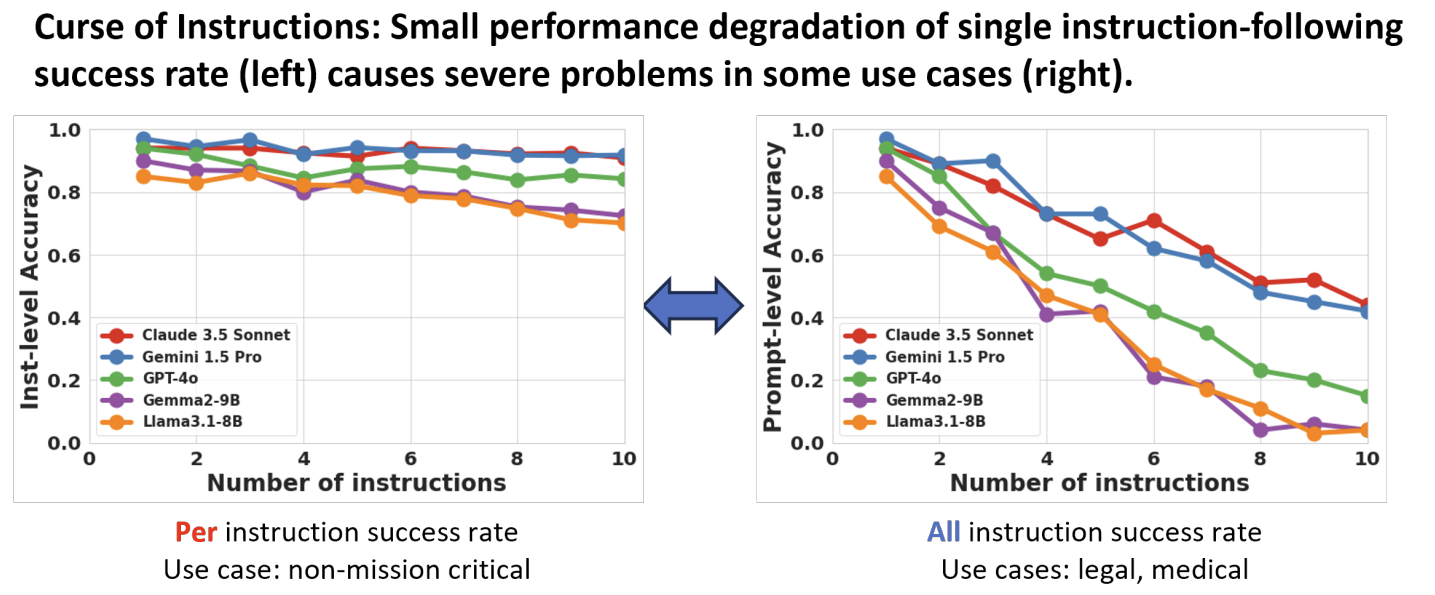
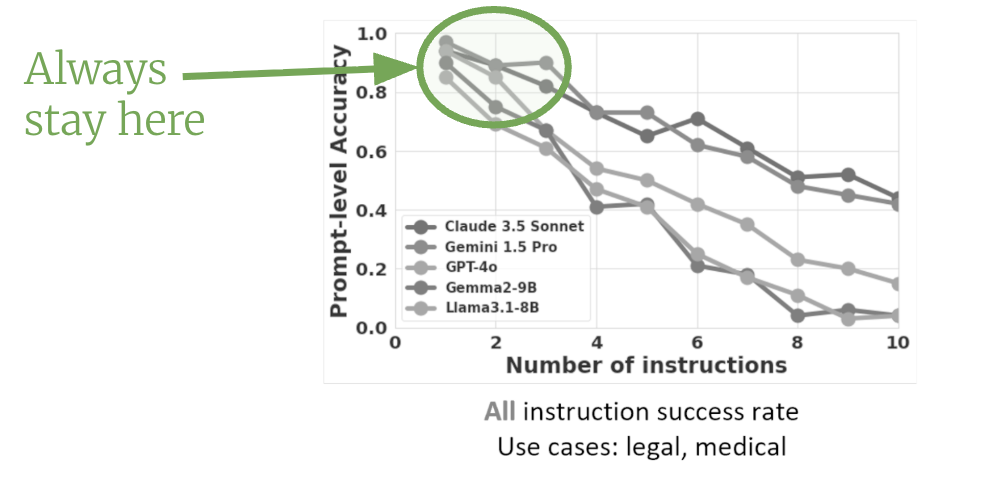
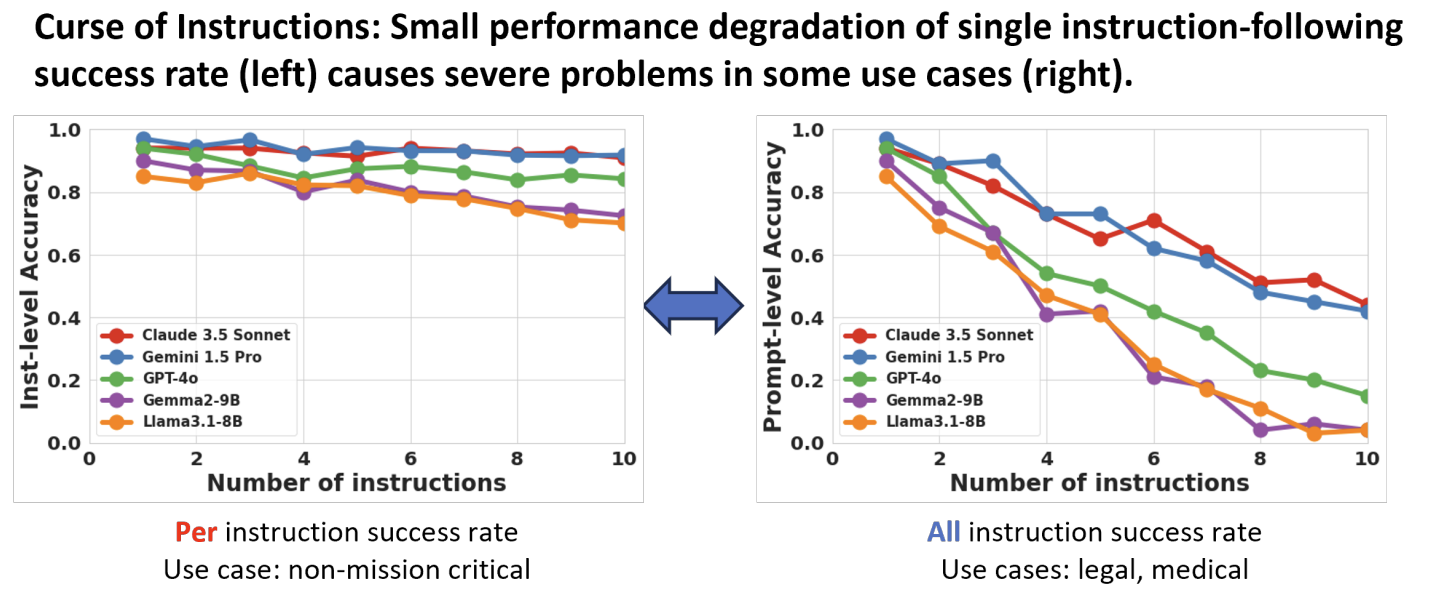
As you add more guidelines, you quickly run into a hard fundamental limitation of LLMs, which is The Curse of Instructions.
The issue is that, as you add more instructions to an LLM's context, its ability to follow them drops dramatically. Not even linearly (which would be bad enough), but dramatically.
Let the implications of that sink in for a moment.
Now, rather than being a particular model's weakness, it unfortunately seems like a fundamental architectural challenge with LLMs, and it applies across the board with every LLM you use. It's why planning and orchestration are the most important differentiating components of any agentic system you encounter.
It's also why Parlant's guideline matching system came into existence. Its core purpose is to "lift the curse" by ensuring your LLM only sees the few most relevant guidelines (and other domain alignment elements) at each point, keeping the model in the "safe zone" where instruction-following is highly consistent:
When you finally deploy your agent to production, you run into real-world user issues, which are, for lack of a better term... messy.
Now, by that time, keep in mind you'll have probably spent months building your agent, but if customers ultimately don't trust it to handle their specific situation correctly, they'll escalate to a human immediately, rendering your investment (the time, effort, and budget you've put into it) significantly less rewarding than you'd hoped.
But how can you ensure that customers trust your agent and engage with it?
The interesting (and more realistic) answer is that, unfortunately, you don't—at least not if you're a developer. It almost always comes down to business stakeholders providing continual feedback (and experimentation), monitoring conversations, and adjusting the agent's behavior over time.
Business stakeholders have a more direct line of sight into customer expectations and pain points, and, not least important is that they also typically have a greater incentive to experiment with the agent's communication effectiveness and optimize it, compared to the engineers on the project.
This is why business experts will constantly provide feedback on agent behavior. While this kind of feedback may not be the most glamorous work to implement as an engineer, it can nonetheless play a pivotal role in the agent's production success metrics.
Let's look at a few examples of real-world feedback from business stakeholders:
"We don't accept Amex cards. It's just misleading the customers and eroding trust, leading to escalation. So before trying and failing, when they provide Amex it should ask them if they have a different card or, alternatively, offer PayPal as a last resort (but make sure you don't mention PayPal until you ascertain they don't have a different card they can use)."
"This customer wants to buy in bulk. That's great but we should get them on a sales call, not handle it here, as the pricing on bulk orders needs to be negotiated."
"This customer just had a bad experience with us; why would you take this opportunity—of all times—to try and upsell them!?"
When such feedback arrives, it often requires reliable correction within hours or days.
Your agent's guideline matching and enforcement system is what makes this feedback cycle possible.
Without a reliable and flexible guideline matching system, every behavioral change can turn into its own task sprint, instead of a quick configuration update. It's hard to isolate the required changes and it's hard to avoid breaking other parts of the agent's behavior.
This ends up being a slow, error-prone, and expensive maintenance process for the whole team.
Let's talk about compliance for a moment. For regulated industries, adherence to business guidelines is, in many cases, non-negotiable.
Every unauthorized statement made by your agent increases the chances for liability and some form of action taken against your organization. Even simply missing a disclosure at the right time in a conversation can create regulatory risk. At scale, one guideline failure in 1,000 conversations can unfortunately mean trouble.
This is why architectural guarantees are so important; so that guidelines will be evaluated and followed as reliably and accurately as possible. Even if you play the game of odds here, your architecture must ensure they're very good odds, while also allowing you to improve over time, without breaking existing stabilized behavior. In other words, the mechanism must maintain robustness even as your agent's complexity grows with further real-world feedback.
When we started building Parlant's guideline matching system, our first instinct was to employ approaches such comparing the semantic similarity of content embeddings, using cross-encoders, or possibly training custom task-head architectures on top.
It seemed elegant: encode guidelines and conversation context as vectors, compute their relevance score (depending on the method), and load the matches which pass the minimal threshold.
Honestly, we already knew semantic similarity wasn't going to work before we tried it, but we studied it anyway.
The idea: Embed guidelines and conversation, compute cosine similarity between the conversation and each guideline, and match the most similar guidelines—or at least ones passing a threshold.
Why it failed: Guidelines often refer to chronological or other semantic nuances, but we couldn't find a single pretrained embedding model that captures them well (and I'll circle back to why we didn't train our own). Think of conditions such as temporal ones ("Card already declined"), logical ones ("AND payment is credit card"), or state transitions ("After confirming the transaction").
Unlike semantic similarity where you embed texts separately and compare vectors, cross-encoders jointly process the guideline and conversation together through a transformer model (like BERT or RoBERTa).
The idea: Feed each guideline-conversation pair into the encoder, let attention mechanisms learn interactions between them, then use a classification head to predict relevance.
The cross-encoder processes both texts together, so theoretically it should capture relationships between them better than independent embeddings. You train it on labeled examples of (guideline, conversation, relevant/not-relevant) tuples.
Why it failed: Much like the embedding approach, all pretrained cross-encoders that we've tried (anything that showed potential on SBERT and HF) struggled heavily with the specific nuances of guideline matching.
The idea here was to train a simple neural network layer on top of embeddings taken from pretrained models. We assumed that extracting embeddings from the last hidden layers of pretrained models would provide useful features for the task. This task head would then be trained from scratch specifically for guideline matching.
But regardless of the embedding source, they just didn't seem to contain enough real information for the task head to learn from.
We trained it on a huge number of examples taken from the Ubuntu Dialog Corpus, but the task head just didn't learn.
Why it failed: No matter how we tuned the architecture or training process, the embeddings appeared to be too lossy. Critical information about chronology, logical operators, and state transitions seems to get compressed away in the final vector representation, and the learning process never converged.
We initially assumed that embeddings from pretrained models would contain enough information about relationships between vectors (e.g., between conversations and guidelines).
The hope was that these vector representations would encode the nuanced relationships we needed for matching. But in reality they didn't seem to contain that information in any learnable form. None of the approaches we tried managed to learn the desired behavior.
Now as to why we didn't design and train our own specialized embedding or cross-encoder models for guideline matching from scratch: it simply wasn't feasible. Such an undertaking would require truly massive datasets and carry significant risk (what if by the end of it, these models still couldn't learn?)
We therefore chose to stand on the shoulders of giants. LLMs, unlike specialized embedding models, were trained not just for language understanding but also for reasoning, instruction following, and text completion. These capabilities made them natural candidates for guideline matching, even if that meant working through the latency and cost challenges that came with them.
Subject of Active Research
We haven't given up on these initial approaches entirely; they're a subject of active research within our team. If you have ideas or experience in this area, we'd love to hear from you, as we'll continually push research boundaries to make guideline matching more efficient.
In short, all of the initial approaches we tried failed miserably to capture critical aspects of guideline matching. Let's see what these are, more concretely:
Conversational Chronology
Consider this guideline:
await agent.create_guideline(
    condition="The customer has already declined an upgrade offer",
    action="Do not mention upgrades again in this session"
)
Models trained on general semantic similarity can tell you that the conversation involves "upgrades" and "declining." But they couldn't reliably us you whether the customer already declined during this conversation, and consequently whether the instruction should be matched once again (and consequently enforced).
Nuanced Context
await agent.create_guideline(
    condition="The customer is having difficulty in making the payment",
    action="Transfer the call to a human agent immediately"
)
If a customer says, "I don't have my card with me right now," this guideline would be unlikely to pass the semantic similarity threshold.
In fact, conditions such as, "The customer is being difficult", or, "The customer is willing to pay immediately" are more likely to match—leading to false-positive matches that steer the conversation even further away from its intended path.
Temporal State Reasoning
await agent.create_guideline(
    condition="After you've verified the customer's identity",
    action="You may discuss account-specific billing details"
)
The word "after" creates a causal dependency. Again, semantic similarity won't capture this temporal relationship, leading to many false-positive as well as false-negative activations.
At this point, we made a pragmatic choice: rather than investing in building and training dedicated guideline matching datasets and models (which would be infeasible at a realistic budget and timeline) we decided to leverage pretrained LLMs for the time being. Their training already equipped them for reasoning and instruction-following, making them well-suited for this task.
At first, we thought this would be straightforward: just write a prompt to say, "reason about the context for a bit and tell me whether this guideline currently applies."
LLMs are smart...right?
It turns out that once you start measuring their consistency across many real-world scenarios, their outputs can be very, very frustrating.
Sure, some guidelines are trivial to match:
await agent.create_guideline(
    condition="The customer asks about store hours",
    action="Tell them we're open Monday-Friday 9-8..."
)
This needs minimal reasoning. Does the conversation mention store hours? Yes or no.
But the problem is that people need, and use, much more nuanced guidelines.
await agent.create_guideline(
    condition="User exhibits frustration with what you JUST offered",
    action="Apologize and offer to transfer them to a human rep"
)
What exactly is meant by "exhibits frustration"? The customer doesn't necessarily use the word "frustrated." It might be implied through sarcasm, terse responses, or references to prior problems.
await agent.create_guideline(
    condition="The customer needs to perform an action with their card "
              "but it isn't exactly clear what that action is",
    action="Ask them to clarify what action they wish to take"
)
When we were on this level of the implementation, we saw this match in intended cases:
Customer: "card help plz"
Agent: "Could you please clarify what you need help you need with it?"
(Agent Reasoning): "The customer mentioned needing help with their card, but it's not clear what specific action they want to take. Therefore, this guideline applies."
As well as unintended ones:
Customer: "I need to lock my card"
Agent: "Could you please clarify what you need help you need with it?"
(Agent Reasoning): "The customer needs to lock their card, which is a form of card-related help, but it isn't clear what they want to do once their card is locked. Therefore, this guideline applies."
At this point, we were like... 🤷♂
So we started evolving our matching prompt. We got it to the point where it was indeed incredibly accurate and consistent! The problem was, it used so much reasoning that it took like 20 seconds to run—before each response!
That's when we realized that this problem is deeper and more complex than we thought... and that all of these subtleties mean that if you use the same matching strategy for both, you either:
Waste compute on the simple cases with unnecessarily deep reasoning
Fail on the complex or nuanced cases with insufficient reasoning
To fix this latency issue, over time we studied many use cases and conversational scenarios, and empirically discovered and optimized for six distinct categories of guidelines, each requiring specialized matching strategies:
1. Observational Guidelines (condition only, no action)
condition="The customer mentioned a discount code"
These record facts about the conversation for other guidelines to reference (usually this is used in deliberate dependency relationships, so as to enable certain guidelines only if certain observations currently apply, which helps to avoid context collision and false positives). These need quick pattern matching.
Incidentally, even these aren't quite trivial. People will often write conditions such as, "The customer said they want to buy a ticket". When exactly should we consider this matched? Only in the immediate next response, throughout the conversation, or only during some particular segment of the conversation?
2. Simple Actionable Guidelines
condition="The customer asks about warranty coverage"
action="Explain our standard 1-year warranty on all products"
These are the most standard condition-action guidelines. They require moderate reasoning, such as observational ones, to evaluate the condition accurately.
The reason they're in a different category is because people will often write conditions that refer to semantics in the action that they specified, such as:
Action: "Provide the confirmed transaction ID"
Condition: "As soon as it's successfully completed"
If we tried to match this guideline only using its condition, we wouldn't know what "it" refers to. So both of them need to be considered in the specialized prompt for this category.
3. Previously Applied Actionable Guidelines
condition="The customer wants to return an item"
action="Explain the 30-day return policy and ask for their order number"
These need special handling: If we already followed this guideline earlier in the conversation, should we apply it again (e.g., due to a sufficiently significant contextual shift)? Or would that cause artificially repetitive behavior?
The interesting thing to note here is that understanding whether an action was applied can be surprisingly tricky, even with LLMs.
Let's take two real-world examples we had to solve:
Often, if the action is something like, "Ask for order number", the agent would ask, and the customer would occasionally ignore the question in their next response. Then we found that the LLM would say, "Oh, the action was already applied, so I don't need to do it again", and the conversation would get derailed. When we looked at the reasoning logs, the LLM said, "Well, I already asked for the order number, so I don't need to ask again." This is one taste of the nuance and complexity involved.
Even after we fixed that first problem, it turns out that in practice people often provide compound actions ("Determine their order number and then explain our refund policy"). Then if only part of the action was applied, the LLM would often say (erroneously), "Oh, I already did that action, so I don't need to repeat it". This required us to implement partial action tracking and reasoning.
Both of these issues required even more structured reasoning in order to get them to work well consistently. But this extra reasoning came at the cost of latency. I'll circle back to this in a bit.
4. Customer-Dependent Actionable Guidelines
condition="The customer wants to send money"
action="Ask for recipient name"
This is the most special case. Like I said above, with normal actionable guidelines, we need to keep track of whether the actions were already performed.
But what happens in the guideline above where you cannot determine if it was performed just based on the agent's message? The action above, strictly speaking, could only be considered completed if the customer actually provided the recipient name in their next message.
This means that we can't reason about it asynchronously after the agent's message is sent, because we need to wait for the customer's next message to see if the action was actually completed.
So in order to save more latency, we specialized a prompt for this special case.
5. Journey Node Selection
When a multi-step journey is active, which step should execute next? This requires reasoning about current journey state, transition conditions between steps, and the customer's latest input.
I won't even discuss this here as it's a whole other level of complexity. Read the code if you're interested: journey_node_selection_batch.py.
6. Disambiguation Guidelines
condition="The customer mentions they want to 'upgrade' "
          "without being clear on what they wish to upgrade"
# Targets: [
#   upgrade_subscription_tier,
#   upgrade_product_model,
#   upgrade_shipping,
# ]
This special category—disambiguating between specific, supported actions—required us to build a custom prompt that presents the possible targets (the ones specifically provided by the designer) and asks the LLM—only when needed—do disambiguate among them.
In case of a likely ambiguity, this strategy would yield a "virtual" temporary guideline, which would instruct the agent to ask for a clarification among the subset of options for which ambiguity was detected.
Guideline Matching Architecture at a Glance:
To sum it all up, if you use the same matching strategy for all guidelines, you either waste compute on simple cases or fail on complex ones.
What made things truly hard for us for a long time (pun intended) was balancing two competing objectives: minimizing response latency while maintaining the agent's accuracy and consistency.
Nuanced reasoning takes time. Multiple LLM calls take time. Reasoning about dozens or even hundreds of guidelines takes a lot of time.
But customers expect quick responses. A 20 second delay while your agent "thinks" about which guidelines apply creates a terrible user experience. Well, that's where we were for a while, for several months, back in Parlant v1.0.
This is where our lead researcher, Bar Karov, came up with the idea of clearly differentiating between work that must happen before each response (hot path) and work that can happen while waiting for the customer's next input (async analysis).
Specifically, we could check whether a guideline was applied after the agent's response was sent, while the customer was reading it and composing their next message. This way, we could offload some of the reasoning work to this async phase, reducing the hot path latency significantly.
If we found that a guideline was indeed applied during this phase, we would then switch its next hot path matching call to a different, specialized prompt that assumes the guideline was applied. Both of the specialized hot path prompts worked much faster than the original one, which combined reasoning for both newly-matched and previously-applied guidelines.
This architecture cut the matching time by more than half. It's the one we've been using since, and it maintains fast response times while still performing comprehensive and accurate guideline matching.
Like I said, in many customer-facing use cases, compliance is non-negotiable. By this point, I've hopefully demonstrated the following points sufficiently:
Dynamic guideline matching is essential for reliable agent behavior (again, see my previous post for more on this).
Guideline matching is a complex task that requires nuanced reasoning, and consequently LLMs.
This complexity leads to high latency and cost if not managed carefully.
Using parallelization and multi-stage analysis, we've managed to get response latencies down to acceptable levels (1-3 seconds on average, depending on the agent's complexity and the model used).
But making 10-20 LLM calls per response can get expensive, especially when using larger models. To tackle the cost issue, what we need to do it reduce the number of guidelines we evaluate deeply (using LLMs).
In well-designed Parlant agents, most guidelines will be scoped to specific customer journeys. This means that if a journey isn't active, its related guidelines shouldn't be evaluated at all. So if we first identified the relevant journeys, and only then evaluated the guidelines of the active journeys, we could significantly reduce the number of guidelines we needed to consider—especially when most times only one journey is active at a time.
This works great at reducing cost, but this 2-stage process introduces latency again. To solve this, we added predictive journey relevance ranking as a first step. We essentially predict the top 3 journeys that we think will be activated, and speculatively evaluate their scoped guidelines in parallel with other hot path work, avoiding the added latency of the second stage—most of the time.
When we parallelize guideline matching, we do so in the form of batching. Each batch corresponds to a specific guideline category, and we process all batches concurrently. So we may have, say, 1 to 5 guidelines per batch, per category.
But batch size is a trade-off that varies between use cases. It controls a latency vs. cost tradeoff: larger batches mean fewer LLM calls (lower cost) but higher latency (due to more completion tokens), while smaller batches mean more LLM calls (higher cost) but lower latency.
So we've made batch size configurable via an OptimizationPolicy which can be overriden using the configure_container parameter when initializing the server. Each requests to the policy comes with a batch type hint, telling you what kind of batch is being created, so you can optimize accordingly:
Once we started working with higher complexities with some of our users, we started seeing their difficulty in scoping guidelines correctly. Very quickly, you get two guidelines that conflict with each other in unexpected ways—and it can often be tricky to isolate the phrasing and fix the agent's behavior.
This is just the complexity of real-world semantics.
To solve this, we introduced Guideline Relationships, which allow designers to explicitly define relationships between guidelines, such as dependencies, mutual exclusions, etc.
This is an important feature of Parlant that allows agent designers to create complex semantics such as, "When this guideline matches, exclude that other guideline (do not apply it) even if it happened to match too," or, "This guideline should only be applied if that other guideline also matched," and so on.
The matching engine must then account for these relationships. We therefore load related guidelines that may not have matched directly but should be included due to entailment relationships and perform other such resolutions (priorities, mutual exclusion, dependencies, etc.) to ensure that the final result is truly aligned to the developer's intent.
Guideline matching can't always be a one-shot process, even when sending a single response.
Why? Because tool calls return new information during response processing, and this new information might trigger additional guidelines that affects the agent's behavior and the response message the customer ends up seeing.
We therefore need to prepare all of the required context before the agent is ready to come out with its fully-aligned response, according to its configuration.
Example scenario (banking agent):
In this case, the agent is configured to offer investment options for customers with more than $10,000 in their checking account. We expect this to happen every time the customer's checking account balance comes up during the conversation, which bridges gracefully into the upsell offer, without being too pushy.
Iteration 1: Customer says "How much money do I have in my checking account?"
Guideline matches: "Customer asks for account information"
Tool called: get_account_info()
Result: {..., "balance": "$1,200"}
Iteration 2: Now we know the customer's balance
New guideline matches: "If you find that their checking account balance is over $10,000, recommend investment options"
Tool called: get_investment_options()
Result: Investment options details
Iteration 3: We have all the information needed
New guidelines matching based on investment options? No.
Ready to respond with a fully-aligned answer!
So when tools are involved, we need to reevaluate relevant result-affected guidelines until we reach a stable state, where we're sure all relevant guidelines have been matched.
Importantly, to control cost and latency, we only evaluate guidelines that could be affected by the new information returned from tool calls. This relationship is configurable using the SDK.
Here's an illustration of this iterative process as it's built into the engine:
Since we know that different guideline categories need different matching strategies, how (and more importantly, when) do we determine which strategy to use for each guideline?
This is where evaluations come in. When you add a guideline to Parlant for the first time (i.e., the first you're running your agent since the guideline's addition), Parlant analyzes it immediately to determine its preferred matching strategy.
# Guideline metadata includes strategy hints guideline =await agent.create_guideline( condition="The customer is a VIP member", action="Offer complimentary priority shipping" ) # Parlant internally marks this as "customer_dependent" # Future matching uses the optimized strategy for that category
This pre-evaluation allows us to completely avoid any runtime overhead for strategy selection. The system already knows which specialized batch and prompts to use for each guideline. We also cache these evaluations so that subsequent restarts of the agent don't require re-evaluation of unmodified guidelines.
We've established that different guideline categories need specialized reasoning. Now let's talk about how that reasoning is structured, because—let me tell you—Chain-of-Thought and off-the-shelf reasoning models provided nothing close to the reliability we needed to guarantee with Parlant
How did we know it wasn't good enough? Because our comprehensive test suite didn't pass anywhere near consistently enough with them. Incidentally, this test suite tells us the real story about any new model launch (despite any benchmark claims), which is why we're also so pedantic on which models Parlant uses under the hood with different providers.
Attentive Reasoning Queries (ARQs) are a novel prompting technique developed for Parlant by our research team, specifically for instruction-following accuracy.
They basically leverage and combine two things:
They rely on an LLM API's ability to generate structured outputs (normally, through constrained decoding), which means we can tightly control what gets generated first.
This control of what goes first allows us to take advantage of the recency bias of LLMs: the most recently presented information has a stronger influence on the output.
Here's how it works, very briefly.
Rather than asking an LLM to reason freely before generating the required output (as in CoT), we provide use-case-specific, systematic reasoning steps with targeted queries that reinstate critical instructions and information from the prompt throughout the process, and provide the required output immediately after "recalling" this high-signal information into the end of the context window, where attention is most focused.
For example, here's a basic ARQ-based completion schema for classifying some inputs (you can do this multiple times throughout the same completion schema):
Chain-of-Thought:
Reason about inputs X and Y...

<END_OF_REASONING_TOKEN>

{
    "classification_for_input_x": "<BOOL>",
    "classification_for_input_y": "<BOOL>"
}
Attentive Reasoning Queries:
{ "notes_about_input_x":"<FILL THIS OUT>", "instructions_regarding_input_x":"<FILL THIS OUT>", "reasoning_about_input_x":"<FILL THIS OUT>", "classification_for_input_x":"<BOOL>", "notes_about_input_y":"<FILL THIS OUT>", "instructions_regarding_input_y":"<FILL THIS OUT>", "reasoning_about_input_y":"<FILL THIS OUT>", "classification_for_input_y":"<BOOL>" }
In this way, the structure allows us to ensure that:
We reason about a classification choice (or any other type of output) right before generating it. The recency bias improves the classification's accuracy when it immediately follows the reasoning.
The reasoning itself immediately follows the reinstatement of notes and instructions regarding the input, improving the reasoning's accuracy and completeness.
Our research paper on ARQs showed compelling results: a 90.2% success rate across 87 test scenarios in Parlant; it significantly outperformed Chain-of-Thought reasoning (86.1%) and far exceeded direct response generation (81.5%); and it was particularly strong at guideline re-application and hallucination prevention.
We carefully tuned the ARQ-based reasoning schemas for each guideline category, optimizing for both accuracy and latency (in that order).
These schemas (coded using Pydantic models) define the exact order and content of the queries. Let me touch on a couple of examples from Parlant's codebase.
Note that the order of fields matters! The LLM must generate each field in sequence:
guideline_id and condition: First, the LLM "recalls" which specific guideline is being evaluated by restating its ID and condition. This leverages recency bias: the information is now at the top of the model's attention.
rationale: Next, the LLM must reason about whether the condition is met, providing specific evidence from the conversation. Because the condition was just restated, attention is focused on it.
applies: Finally, the LLM outputs the boolean decision, immediately following the reasoning. The recency of the rationale ensures the decision is grounded in the just-completed analysis.
Example output for condition="The customer mentioned a discount code":
{ "guideline_id":"3", "condition":"The customer mentioned a discount code", "rationale":"The customer stated a discount code (SAVE20)", "applies":true }
This sequential structure prevents the LLM from making snap decisions based on semantic similarity alone. It must explicitly reason first.
These guidelines have already been followed once in the conversation. Should they apply again? Remember, we're looking for a robust and consistent solution.
To consistently pass our comprehensive test suite (rather than a few simple demo cases), here's the ARQ set we've optimized over time:
guideline_id, condition, action: Recall the guideline being evaluated: both its condition and its action.
condition_met_again: Evaluate whether the condition that originally triggered this guideline is met again in the current context. This forces explicit temporal reasoning.
action_wasnt_taken: If the condition is met again, determine if the action wasn't yet taken in this new context. This step is optional (nullable) because if the condition isn't met again, this question is irrelevant.
should_reapply: Final decision about re-application, made after explicitly reasoning about context shifts.
Example for condition="The customer wants to return an item", action="Explain the 30-day return policy and ask for their order number":
{ "guideline_id":"3", "condition":"The customer wants to return an item", "action":"Ask for their order number", "condition_met_again":true, "action_wasnt_taken":true, "should_reapply":true }
Here, the customer may have mentioned returns again, but regarding a different item, so we must ask for the order number again.
When we didn't have this ARQ structure, even the best LLMs would often say "no, don't reapply" or "yes, reapply" without proper reasoning, leading to inconsistent behavior.
We have a very comprehensive test suite. Parlant was built from the ground up with test-driven development. We have hundreds of unit tests that define what correct behavior looks like.
Most importantly, we did start out with very simple implementations that seemed like they should work (as I've touched on in the beginning of this post). They just failed too many tests in our suite, too frequently.
Yet the whole point with Parlant is to enable truly reliable and compliant conversations, so passing the test suite wasn't an option. Of course, if you don't require reliability with your agents, you should probably use a different solution. But if you do, we're basically working our butts off to provide a truly accurate and scalable solution that you can trust to put in front of your customers in large-scale production deployments.
As Parlant's open-source, our research and innovations will continue to be open for everyone to build upon, we continually find further ways to optimize and improve in every dimension, so that compliant agents can be achieved through an elegant, maintainable, and easy to control interface.
To give you a sense of the kinds of scenarios we cover, here are some real tests from our suite that validate critical aspects of guideline matching.
Note that these tests aren't vague. We don't score "friendliness" or "helpfulness." These are concrete, binary correctness tests that validate specific reasoning capabilities of the guideline matching system.
In other words, we didn't build them to fool ourselves with fuzzy metrics, but rather to provide a clear mirror to help us ensure that the agent behaves correctly in well-defined, critical scenarios.
We've validated our guideline matching techniques across multiple LLM providers, including OpenAI (GPT-4* series), Anthropic (Claude Sonnet 3 and up), Google (Gemini Flash 2.5, and Llama 3.*).
Performance varies by model. All medium-to-large models do quite well, but not all perform equally. OpenAI's models tend to be the most consistent throughout the test suite, while Llama 3.* models have curiously done better at some of the harder tasks.
Our testing process is the reason why we're somewhat selective about which models Parlant uses by default for different operations, with different providers.
Now, because Parlant is open-source, development teams can run the full test suite with their preferred LLM provider to verify compatibility. If you're considering using Parlant with a specific model (like Cohere Command R+ or others), you can validate its performance with your agent's requirements by running the tests yourself.
This transparency allows you to make informed decisions about which LLMs to use, and even switch providers if needed while maintaining confidence in Parlant's reliability.
Let's look at a few examples from our BDD test suite.
This test validates that the guideline matching system can find the 1 relevant guideline among 51 total guidelines without false positives.
Scenario: The agent finds and follows relevant guidelines like a needle in a haystack
    Given an agent
    And an empty session
    And a customer message, "I'm thirsty"
    And a guideline to offer thirsty customers a Pepsi when the customer is thirsty
    And 50 other random guidelines
    When processing is triggered
    Then a single message event is emitted
    And the message contains an offering of a Pepsi
Naive approaches that rely purely on semantic similarity or don't properly filter guidelines will fail this test by either missing the relevant guideline entirely (false negatives), obfuscating the LLM's instructions by including irrelevant guidelines in the context (false positives), or simply taking too long to process.
Scenario: Journey returns to earlier step when the conversation justifies doing so
    Given an agent
    And the journey called "Book Taxi Ride"
    And a journey path "[2, 3, 4]" for the journey "Book Taxi Ride"
    And a customer message, "Hi, I'd like to book a taxi for myself"
    And an agent message, "Great! What's your pickup location?"
    And a customer message, "Main street 1234"
    And an agent message, "Got it. What's your drop-off location?"
    And a customer message, "3rd Avenue by the river"
    And an agent message, "Got it. What time would you like to pick up?"
    And a customer message, "Oh hold up, my plans have changed. I'm actually going to need a cab for my son, he'll be waiting at JFK airport, at the taxi stand."
    When processing is triggered
    Then a single message event is emitted
    And the message contains asking the customer for the drop-off location
This test validates intelligent journey state reasoning: The customer's new information invalidates previously collected pickup location, requiring the system to backtrack to step 2 (pickup location) rather than continuing to step 5.
Nuanced Condition Evaluation with Agent Intention
Scenario: The agent ignores a matched agent intention guideline when it doesn't intend to do its condition
    Given an agent
    And an empty session
    Given a guideline to remind that we have a special sale if they book today when you recommend flight options
    Given a guideline to suggest only ground based travel options when the customer asks about travel options
    And a customer message, "Hi, I want to go to California from New york next week. What are my options?"
    When processing is triggered
    Then a single message event is emitted
    And the message contains a suggestion to travel with bus or train
    And the message contains no flight option
    And the message contains no sale option
This test validates that the system correctly understands the first guideline's condition includes "when you recommend flight options" as a prerequisite. Since the second guideline explicitly says "suggest only ground-based travel," the agent won't be recommending flights, so the first guideline shouldn't match.
This requires semantic understanding and prediction of probable agent intentions within guideline conditions—another thing I've yet to touch on in the implementation details, but which Parlant also performs.
Parlant's test suite spans over more than 1,000 unique tests covering a wide range of guideline matching scenarios, including edge cases and complex interactions.
Every component of the guideline matching system exists because removing it breaks specific tests.
In these, we ensure:
Consistent handling of temporal reasoning edge cases
Reliable prevention of repetitive or inappropriate guideline reapplication
Accurate journey progression through complex multi-step flows
To wrap it all up, here's how we got here:
Phase 1: Started with naive implementations (e.g., embeddings)
Phase 2: Added simple LLM-based matching
Phase 3: Introduced categorization and specialized strategies
Phase 4: Developed ARQs for each category
Phase 5: Optimized with multi-stage pipeline and parallel processing
Each phase was driven by test failures showing us exactly where the system was breaking.
But making that simple concept work reliably in the chaotic reality of human conversation—as you can now see—takes a lot of fairly sophisticated engineering under the hood.
That's what we mean when we say Parlant does the heavy-lifting for you so that you can focus on a simple declarative interface for defining your agent's behavior, while addressing the complexities of real-world customer interactions.
We fundamentally believe the feedback cycle of building agents, across all stakeholders, should be simple. Business experts should be able to say: "When this happens, the agent should do that".
And a developer should be able to implement it in minutes—and have it work reliably—every time, in every context, across millions of conversations.
To recap, here's what we've designed and implemented over time to make this a reality:
Optimized matching strategies per category
Automatic categorization of guideline types
Multi-stage pipeline with filtering and batching
Parallel processing for latency optimization
ARQ-structured reasoning for consistency
Iterative preparation loops for correct context assembly
Extensive test coverage to catch edge cases
In doing so, we've built a system that uses declarative guidelines reliably, while it avoids:
Brittle prompt engineering where one change breaks five other things.
Bespoke, rigid graphs and decision trees that can't handle natural conversation flow.
That's what guideline matching enables, and why we think it's worth investing in its complexity. I hope that you do too!
Building reliable customer-facing conversational AI is a hard problem—unlike what they say... While we're not claiming to have solved it perfectly (we're getting there), we've made significant progress, and we're sharing that progress openly. And I think it's fair to say we're currently leading the way in this space.
If you're building conversational agents, you'll encounter these challenges. Understanding guideline matching more deeply helps you make informed architectural choices, whether you use Parlant, build your own solution, or hybrid both approaches.
Lastly, I want to thank Alex Shtoff for reviewing the post, and helping to flesh it out, make it clearer, more palatable, and more useful.
You've built a sophisticated support agent with LangGraph. The supervisor pattern routes queries beautifully, your specialized agents handle their domains, and you're proud of what you've shipped!
But as conversations scale, you're noticing the cracks: users asking about billing and data plans in the same breath, context getting lost between agent handoffs, prompts becoming unwieldy as you add more capabilities.
Sound familiar? You're not alone, and you don't need to rebuild everything from scratch.
If you're new to the differences between LangGraph and Parlant, I recommend starting with our Parlant vs LangGraph post to understand the fundamental architectural differences.
This post assumes you understand those differences and are ready to make the (partial) migration - specifically, the part that's in charge of conversational steering.
Before we dive into the technical details, let me paint a picture of what your development experience will look like after migrating conversational control to Parlant:
For Developers:
Your LangGraph code stays focused on what it does best: complex backend workflows, retrieval orchestration, and multi-step data processing
Conversational behavior lives in declarative guidelines and journeys, separate from "backend" logic
Adding new conversational capabilities means introducing guidelines, not refactoring your entire graph
Your prompts are modular, task-specific, contextually-loaded, and don't suffer from the curse of instructions
For Business Experts:
Product managers and domain experts can modify conversational behavior directly through specifying contextual guidelines, without getting involved in graphs and routers
Changes to conversation flows don't require developer intervention for every iteration
A/B testing different conversational approaches becomes straightforward
Compliance requirements map cleanly to enforceable guidelines
For Users:
Conversations flow naturally across multiple topics without awkward "let me route you" interruptions
The agent maintains coherent context even as topics interweave
Multi-message exchanges feel like real conversations, not rigid request-reply loops
The agent can proactively follow up, handle interruptions, and manage complex multi-step interactions
This won't just be a technical migration, but more of a fundamental improvement in how you build, maintain, and scale conversational AI.
Let's start by examining a typical LangGraph supervisor pattern implementation for a telecom customer support system. This will help us identify what needs to migrate and what can stay.
In a telecom support context based on the supervisor pattern, you typically have specialized agents handling different domains:
Here's how this typically looks in terms of a LangGraph implementation:
from langgraph.graph import MessagesState, StateGraph, START, END from langgraph.prebuilt import create_react_agent from typing import Annotated from langchain_core.tools import tool, InjectedToolCallId from langgraph.prebuilt import InjectedState from langgraph.types import Command # Define specialized tools for each domain @tool defcheck_account_balance(customer_id:str)->dict: """Check the customer's current account balance.""" # Implementation here return{"balance":150.00,"due_date":"2025-11-15"} @tool defget_current_plan(customer_id:str)->dict: """Get customer's current data plan details.""" return{"plan":"Unlimited Pro","data_used":"45GB","data_limit":"Unlimited"} @tool deffind_available_plans(usage_pattern:str)->list: """Find data plans based on usage pattern.""" return[ {"name":"Basic 10GB","price":40,"data":"10GB"}, {"name":"Premium 50GB","price":60,"data":"50GB"}, {"name":"Unlimited Pro","price":80,"data":"Unlimited"} ] # Create specialized agents billing_agent = create_react_agent( model="openai:gpt-4", tools=[check_account_balance], prompt=( "You are a billing specialist for a telecom company.\n\n" "INSTRUCTIONS:\n" "- Help customers with bill inquiries, payment issues, and charge explanations\n" "- Always verify the customer's account before discussing billing details\n" "- Be clear and transparent about all charges\n" "- If a customer disputes a charge, explain it thoroughly but escalate if unresolved\n" "Respond ONLY with the results of your work." ), name="billing_agent", ) data_plan_agent = create_react_agent( model="openai:gpt-4", tools=[get_current_plan, find_available_plans], prompt=( "You are a data plan specialist.\n\n" "INSTRUCTIONS:\n" "- Help customers understand their current plan and usage\n" "- Recommend plans based on their actual usage patterns\n" "- Focus on finding the best value for the customer\n" "- Explain the benefits of each plan clearly\n" "Respond ONLY with the results of your work." ), name="data_plan_agent", ) # Create handoff tools for supervisor defcreate_handoff_tool(*, agent_name:str, description:str): name =f"transfer_to_{agent_name}" @tool(name, description=description) defhandoff_tool( state: Annotated[MessagesState, InjectedState], tool_call_id: Annotated[str, InjectedToolCallId], )-> Command: tool_message ={ "role":"tool", "content":f"Successfully transferred to {agent_name}", "name": name, "tool_call_id": tool_call_id, } return Command( goto=agent_name, update={**state,"messages": state["messages"]+[tool_message]}, graph=Command.PARENT, ) return handoff_tool assign_to_billing = create_handoff_tool( agent_name="billing_agent", description="Transfer to billing specialist for bill inquiries and payment issues.", ) assign_to_data_plan = create_handoff_tool( agent_name="data_plan_agent", description="Transfer to data plan specialist for plan changes and recommendations.", ) # Supervisor agent supervisor_agent = create_react_agent( model="openai:gpt-4", tools=[assign_to_billing, assign_to_data_plan], prompt=( "You are a supervisor managing customer support agents.\n\n" "AVAILABLE AGENTS:\n" "- billing_agent: Handles bill inquiries, payment issues, charge explanations\n" "- data_plan_agent: Handles data plan inquiries, upgrades, recommendations\n\n" "INSTRUCTIONS:\n" "- Route each customer query to the most appropriate specialist\n" "- Assign work one agent at a time\n" "- Do not attempt to handle queries yourself\n" ), name="supervisor", ) # Build the graph telecom_support =( StateGraph(MessagesState) .add_node(supervisor_agent, destinations=("billing_agent","data_plan_agent", END)) .add_node(billing_agent) .add_node(data_plan_agent) .add_edge(START,"supervisor") .compile() )
The key insight is this: LangGraph becomes your backend retrieval layer, while Parlant becomes your conversational control layer. So instead of a complete rewrite, you're implementing a strategic separation of concerns:
However, knowledge base access needs to be transformed into a tool that Parlant can call:
import parlant.sdk as p @p.tool asyncdefsearch_knowledge_base( context: p.ToolContext, query:str )-> p.ToolResult: """Search the knowledge base for information to answer customer questions.""" # Call your LangGraph retrieval workflow result =await retrieval_graph.ainvoke({"query": query}) return p.ToolResult( data=result["synthesized_answer"], metadata={ "sources":[doc.metadata for doc in result["reranked_docs"][:3]] } )
Move to Parlant everything related to conversational behavior:
1. Routing Logic
Instead of a supervisor deciding which agent to call, use Parlant's dynamic guideline matching to create a single, coherent, and comprehensively grounded agent:
# The supervisor's routing logic becomes contextual guidelines
await agent.create_guideline(
    condition="The customer asks about their account balance",
    action="Provide their account balance ",
    tools=[get_account_overview],
)

await agent.create_guideline(
    condition="The customer wants to change or upgrade their data plan",
    action="Recommend appropriate upgraded plans based on their needs",
    tools=[get_current_plan, find_available_plans],
)
2. Conversational Prompts
General "job description" parts of the prompt go into agent description. Instructional sections about "how to converse" become granular guidelines:
agent =await server.create_agent( name="Telecom Support Agent", description="""\ A helpful customer support agent for a telecom company, assisting with billing, data plans, and technical support""" ) # From LangGraph prompt: "Always verify the customer's account before discussing billing details" await agent.create_guideline( condition="You're about to discuss sensitive billing information", action="Ask for their PIN to verify their identity before proceeding", ) # From LangGraph prompt: "Be clear and transparent about all charges" await agent.create_guideline( condition="You're explaining charges to a customer", action="Explain each charge clearly, and proactively address common concerns", )
3. Multi-Step Conversation Flows
Sequential interaction designs become Parlant journeys:
# Plan upgrade flow journey =await agent.create_journey( title="Data Plan Upgrade", triggers=["The customer wants to upgrade their data plan"], description="Guide customer through plan selection and upgrade process" ) t1 =await journey.initial_state.transition_to( tool_state=get_current_plan, ) t2 =await t1.target.transition_to( chat_state="Present current usage and ask about their needs" ) t3 =await t2.target.transition_to( tool_state=find_available_plans, condition="Customer has shared their needs" ) t4 =await t3.target.transition_to( chat_state="Recommend plans based on their usage pattern" ) t5 =await t4.target.transition_to( chat_state="Confirm selected plan and explain next steps", condition="Customer has selected a plan" ) t6 =await t5.target.transition_to( tool_state=process_plan_upgrade, condition="Customer confirms upgrade" ) t7 =await t6.target.transition_to( chat_state="Confirm upgrade is complete and summarize changes" )
import parlant.sdk as p @p.tool asyncdefsearch_policy_docs( context: p.ToolContext, query:str )-> p.ToolResult: """Search company policy documentation for relevant information.""" # Run the LangGraph workflow result =await retrieval_workflow.ainvoke({"query": query}) return p.ToolResult( data=result["answer"], metadata={ "sources":[ {"title": doc.metadata["title"],"url": doc.metadata["url"]} for doc in result["documents"] ] } ) # Associate with guideline await agent.create_guideline( condition="Customer asks about company policies, terms of service, or coverage details", action="Search the policy documentation and provide a clear, accurate answer based on official policy", tools=[search_policy_docs] )
Pattern 2: Conversational Tools → Parlant Tools with Guidelines
If your tool should be triggered based on conversation context, convert it to a Parlant tool with guideline association.
Before (LangGraph with implicit tool calling):
The problem with LangGraph's implicit tool calling is that the LLM can hallucinate or infer parameter values. We've seen production cases where the LLM guesses amounts based on previous transactions ("You sent $50 last time, I'll send $50 again"), infers recipients from context without confirmation ("You mentioned John earlier, I'll send it to John").
@tool defsend_money(sender_id:str, recipient:str, amount:float)->dict: """Send money to another account.""" # Process transaction return{ "status":"success", "transaction_id":"TXN-12345", "amount": amount, "recipient": recipient } payment_agent = create_react_agent( model="openai:gpt-4", tools=[send_money], prompt="You help customers send money. Process transfers when requested." )
After (Parlant with explicit contextual guideline and parameter annotations):
import parlant.sdk as p from typing import Annotated @p.tool asyncdefsend_money( context: p.ToolContext, recipient: Annotated[str, p.ToolParameterOptions( source="customer",# Must come from customer explicitly description="The recipient's account number or username" )], amount: Annotated[float, p.ToolParameterOptions( source="customer",# Must come from customer explicitly description="The amount to transfer in USD" )], )-> p.ToolResult: """Send money from customer's account to a recipient.""" # Process the transaction result =await payment_api.transfer( from_account=context.customer_id, to_account=recipient, amount=amount ) return p.ToolResult( data=f"Successfully sent ${amount} to {recipient}. Transaction ID: {result['transaction_id']}", canned_response_fields={# If you're using canned responses... "amount":f"${amount}", "recipient": recipient, "transaction_id": result["transaction_id"] } ) # Explicit conditional trigger await agent.create_guideline( condition="Customer wants to send money or transfer funds to someone", action="Process the transfer and confirm the transaction details", tools=[send_money], )
Parlant's ToolParameterOptions solves the hallucination problem by explicitly controlling where each parameter comes from. With source="customer", the Parlant agent must ask the customer directly and cannot infer or guess values. With source="context", parameters are pulled from secure session data and cannot be taken from conversation history.
One of the most significant advantages you'll gain from migrating to Parlant is its event-driven conversational API. This is fundamentally different from the request-reply pattern most LangGraph implementations use.
With this event-driven architecture, you automatically support:
1. Multi-Message Input
// Frontend (users) can send multiple messages before agent responds
await conversation.sendMessage("Hi there");
await conversation.sendMessage("I need to upgrade my plan");
await conversation.sendMessage("Oh, and check my bill too, please");

// Agent sees all three in context and responds once
2. Proactive Agent Follow-Up
@p.tool asyncdefpurchase_flight_ticket( context: p.ToolContext, flight_details:str )-> p.ToolResult: """Schedule a proactive follow-up message.""" # Schedule async task asyncio.create_task(follow_up_on_flight_ticket_purchase( context.session_id, flight_details ))# In a real implementation, you'd need to clean up this task in a done-callback return p.ToolResult(data="Ticket purchase initiated. You'll receive an update shortly.") asyncdeffollow_up_on_flight_ticket_purchase(session_id:str, flight_details:str): await flight_api.book_ticket(flight_details) # Emit agent message proactively await client.sessions.createEvent(session_id,{ "kind":"message", "source":"ai_agent", "guidelines":[ {"action":"Confirm flight ticket was booked."}, ], })
3. Interruptions and Cancellations
# User can interrupt ongoing operations
await agent.create_guideline(
    condition="Customer says 'cancel', 'stop', 'never mind', or similar",
    action="Confirm the cancellation, and ask what they'd like to do instead"
)
If You Want to Keep Your Existing UI's API Contract...
If you've already built a frontend around a traditional request/response API and can't migrate immediately, you can create an adapter easily. Our docs show how to build a Custom Frontend that translates between your existing API and Parlant's event-driven model.
However, we strongly recommend migrating to the event-driven pattern for production use. It provides a significantly better user experience and is more robust for real-world conversational applications.
Architecture Recommendation: Parlant as API, LangGraph as Backend
Now that we've covered the individual migration pieces, let's look at the recommended overall architecture:
Migrating from LangGraph to Parlant isn't about replacing one framework with another. Instead, it's about strategically positioning each tool where it excels.
LangGraph continues to power your backend orchestration, handling complex workflows and data processing. Parlant takes control of the conversational layer, delivering natural, coherent dialogue that scales.
A cleaner architecture where conversational behavior is separated from business logic, making both easier to develop, maintain, and implement feedback from business stakeholders.
Better conversations where users can naturally discuss multiple topics, interrupt, ask follow-up questions, and receive coherent responses that maintain context.
Faster iteration where adding new conversational capabilities means writing a guideline, not refactoring graphs and prompts.
Team empowerment where business experts can refine conversational behavior without developer intervention for every change.
Production-ready AI with compliance guarantees, event-driven conversations, and enterprise features built in.
Migrating can feel daunting, but you don't have to do it alone. Our team has helped other companies migrate from LangGraph to Parlant, and we're here to help you too.
Get ready for a hardcore deep dive! The most asked-for framework comparison from the Parlant community is finally here.
"How is Parlant different from LangGraph?" "Can I use them together?" "Which one should I use for my AI agent and why?"
These are the great questions we've been getting from back when we launched Parlant v1.0. And the reason they're great is that they allow us to get right to the heart of what makes Parlant unique, why we even built it, and the surprising lessons we've learned building real-world conversational AI while working with truly large-scale clients.
When coders first approach building conversational agents, graph-based architectures like LangGraph feel intuitive and familiar. Router patterns and specialized nodes map cleanly to how we think about organizing functionality. This is why these patterns are so popular.
However, through years of studying and building production conversational systems, working with some of the top professionals in the field (shout out to CDI), we've discovered challenges that most developers aren't aware of when they start. These challenges aren't immediately obvious: they emerge gradually as your agent handles more conversations, more topics, and more complex user behaviors.
In this post, we'll demonstrate how router-based architectures inherently fail for natural, free-form conversation—not due to implementation details you can fix, but due to fundamental architectural constraints. Understanding these limitations now can save you from a complete rewrite later when you discover your graph-based system can't scale to handle the way users actually converse.
Let me break down the key differences, explain where LangGraph's common patterns create challenges for conversational AI, and show you why and how Parlant approaches these problems differently.
LangGraph is a framework for building agentic workflows through explicit graph-based orchestration. It excels at task decomposition, multi-step automation, and scenarios where you need precise control over execution flow.
Parlant is an AI alignment engine designed specifically for natural customer-facing dialogue. It's built to handle free-form conversations where users don't follow scripts: they mix topics freely, and expect coherent responses across multiple contexts simultaneously.
They solve different problems. Actually, they can work together—LangGraph can function as a lower-level orchestration framework triggered by a Parlant agent's tools for complex retrieval, action workflows, or specialized reasoning tasks.
LangGraph represents agentic applications as graphs where nodes are computational steps (LLM calls, tool invocations) and edges define control flow. This architecture is powerful for workflow automation and task orchestration.
The most popular patterns for building agents with LangGraph include:
1. Supervisor (Router) Pattern
A central coordinator (supervisor) routes requests to specialized agents based on the query type. Each specialized agent has its own system prompt optimized for a specific domain.
# Simplified LangGraph supervisor pattern from langgraph.graph import StateGraph # Define specialized agents returns_agent = create_agent("You are an expert in returns...") warranty_agent = create_agent("You are an expert in warranties...") billing_agent = create_agent("You are an expert in billing...") # Supervisor routes to the right agent defsupervisor_node(state): # LLM decides which agent should handle this next_agent = supervisor_llm.invoke(state["messages"]) return{"next": next_agent} workflow = StateGraph() workflow.add_node("supervisor", supervisor_node) workflow.add_node("returns_agent", returns_agent) workflow.add_node("warranty_agent", warranty_agent) workflow.add_node("billing_agent", billing_agent) workflow.add_conditional_edges("supervisor", route_to_agent)
2. Multi-Agent Network
Agents communicate in a many-to-many pattern, where each agent can invoke others as needed. This provides flexibility but requires careful coordination logic.
# Multi-agent network pattern from langgraph.graph import StateGraph # Each agent can invoke others defresearch_agent(state): result = research_llm.invoke(state["messages"]) if needs_writing_help(result): # Agent decides to call writing agent return{"next":"writing_agent","data": result} return{"messages": result} defwriting_agent(state): result = writing_llm.invoke(state["messages"]) if needs_fact_check(result): # Agent decides to call research agent return{"next":"research_agent","data": result} return{"messages": result} # Build network with many-to-many connections workflow = StateGraph() workflow.add_node("research_agent", research_agent) workflow.add_node("writing_agent", writing_agent) workflow.add_node("editing_agent", editing_agent) workflow.add_node("review_agent", review_agent) # Each agent can transition to multiple others workflow.add_conditional_edges("research_agent", route_from_research) workflow.add_conditional_edges("writing_agent", route_from_writing) workflow.add_conditional_edges("editing_agent", route_from_editing)
3. Hierarchical Teams
Supervisor agents manage their own teams of specialized agents, creating nested structures for complex workflows.
The framework gives you precise control over execution paths, which is exactly what you want for many agentic processes, specifically ETL type of workflows.
Here's where things get interesting for conversational AI. The router pattern (i.e., "supervisor"), where specialized nodes own specific tasks and topics, works beautifully for workflow orchestration but creates inherent challenges when users engage in natural, free-form dialogue.
Let me walk you through the problems that arise from this architecture.
"Hey, I need to return this laptop. Also, what's your warranty on replacements?"
In a router system, that message gets routed to one specialized agent.
Let's say it lands on the Returns Agent. This agent has a system prompt optimized for returns. It knows the return policy inside and out. But what about warranties? That's the Warranty Agent's domain.
The Returns Agent is now faced with four practical "alternatives" for handling the warranty question, none of which are actually any good:
Option 1: Ignore the warranty question
"Sure, I can help you with that return. What's your order number?"
↪ Poor UX. The customer explicitly asked about warranties and got no acknowledgment.
This is not how a good conversational framework should behave.
Option 2: Acknowledge the limitation
"I can help with the return. Regarding the warranty on replacements, I'm not certain about those details."
↪ This is not only awkward, but, from the overall agent's perspective, is incorrect. The overall agent can handle warranty questions—it just routed to the wrong specialized node. This will frustrate both users and developers, and lead to a disjointed user experience.
This, too, is not how a good conversational framework should behave.
Option 3: Hallucinate an answer
"Sure! Our return policy is 30 days, and all replacements come with a 5-year warranty."
↪ Dangerous and extremely common—as well as hard to prevent with LLMs. The Returns Agent isn't grounded in warranty information, but, being an LLM, will often attempt to fabricate an answer. That "5-year warranty" might be completely wrong.
This, too, is not how a good conversational framework should behave.
Option 4: Stack the topics
"Let me help you with that return first, and then we'll get to your warranty question."
↪ This is actually (kind of?) reasonable. The agent acknowledges both questions and proposes handling them sequentially. Many LangGraph implementations do exactly this.
But even option 4 is not how a good conversational framework should behave. It still smells of a fundamental design flaw, because it often leads to poor user experience.
When your AI user experience is poor, many users mistrust in it when it comes to important matters, and consequently drop out of your AI agent and escalate to a familiar human agent experience. That's where you're leaving money and customer satisfaction on the table.
Many natural conversations don't present as "two separate questions." The "topics" (from a backend classification perspective) are naturally intertwined throughout the interaction. Forcing an artificial separation feels robotic. Consider this:
"I bought this laptop for my business but it's broken. Can I return it and get a tax invoice for the replacement?"
The return process and the business tax documentation question aren't separate topics the user is stacking. They're deeply connected:
The tax invoice depends on whether a return is processed
Business customers may have different return policies
The replacement timing affects when documentation is issued
Forcing the agent to say "Let me handle your return first, then we'll discuss invoicing" creates unnecessary friction and invites avoidable questions and objections.
In natural conversation, you'd expect both aspects to be addressed together:
"Absolutely, we can process that return. For your replacement, I'll ensure you receive a proper tax invoice. Let me pull up your account—is the business registered under the same email?"
This is what a well-designed conversational framework should deliver, and it's exactly one of the design goals Parlant was built to achieve.
Another pattern that emerges frequently in natural conversation: topics don't just appear once and disappear. Users jump between topics, then circle back. And once multiple topics have entered the conversation, they tend to remain relevant—at least to some degree—for the rest of the discussion.
Consider this conversation flow:
Customer: "I'd like to return this laptop I bought last week."
Agent (Returns): "I can help with that. Can you provide your order number?"
Customer: "Yeah let me get it, one sec. By the way, do you have the new model in stock? The one with the better battery?"
Agent (Inventory): "Yes, we have the XPS 15 with extended battery in stock. Would you like me to reserve one for you?"
Customer: "Yes, perfect. So if I return this one and get that new model, will I need to pay the difference, or can I just exchange them?"
Now the conversation needs to reference both the return process AND the inventory/pricing information. The customer isn't asking two separate questions—they're asking about the relationship between the return and the new purchase.
In a router system, this message gets routed to one specialized agent. If it goes to the Returns Agent, it can handle the return part but isn't grounded in current inventory pricing. Or perhaps it routes to the Billing Agent, which can discuss pricing but isn't grounded in returns.
The challenge is that once both topics have been introduced, the rest of the conversation will, in high likelihood, need to reference both in some form or another.
The user isn't thinking "Now I'm in Returns mode" or "Now I'm in Inventory mode". They're thinking about their situation holistically, which spans both domains.
Every subsequent message will be handled by one specialized node that's ungrounded with respect to the other relevant topic. The conversation's integrity and coherence fragments precisely when it needs to be most cohesive.
A conversational AI framework that's understands natural conversations should support seamless context switching and multi-topic awareness, and it's exactly one of the design goals Parlant was deliberately designed to achieve.
When you route to a specialized node for topic X, that node is inherently unspecialized for topic Y.
Real conversations don't respect domain boundaries. Users mix topics in single messages, jump between topics, and expect coherent responses that integrate multiple contexts. A router/specialized node architecture forces you to choose one domain's grounding at the expense of others
We created Parlant from a clear vision of, and frustration from these age-old problems in mechanistic AI conversations.
We thus decided to take a fundamentally different approach optimized for natural dialogue: dynamic assembly of a comprehensive context instead of artificially segmented routing.
Rather than routing messages to specialized nodes, Parlant evaluates ALL of your guidelines and other contextual information, and loads only the relevant ones for each conversation turn—i.e., for each user-observable LLM request.
# Parlant approach - no routing, just conditional guidelines
await agent.create_guideline(
    condition="The customer wants to return an item",
    action="First acknowledge their concern, explain our 30-day return policy, "
           "and ask for their order number"
)

await agent.create_guideline(
    condition="The customer asks about warranty on replacements",
    action="Explain that all replacement items come with our standard warranty, "
           "which covers manufacturing defects for 1 year from the replacement date"
)

await agent.create_guideline(
    condition="The customer needs a tax invoice for a business purchase",
    action="Let them know we'll include a proper tax invoice with their order documentation"
)

await agent.create_guideline(
    condition="The customer asks about store hours",
    action="Tell them we're open Monday-Friday 9-8, Saturday 10-6, and Sunday 12-5"
)
Notice what's different here: there's no routing decision. When the customer says, "I need to return this laptop for my business and get a tax invoice for the replacement," Parlant's guideline matcher evaluates all guidelines and determines that three are contextually relevant:
The return guideline (customer wants to return)
The tax invoice guideline (business purchase context)
The warranty guideline (mentioned replacement)
They get loaded into the LLM's context simultaneously. The agent composes a response that's dynamically grounded in all of them:
"I'd be happy to help you with that return and ensure you get proper documentation. Let me pull up your order—could you provide the order number? Once I have that, I'll process your return and make sure your replacement comes with a tax invoice for your business records. Just to confirm, the business is registered under the same email as this order?"
So, instead of choosing between domains, the Parlant agent assembles all the relevant grounding context on-demand.
More often than not, real-world customer conversations break your textbook vision of an architected dialogue.
Parlant's approach solves the problems we identified earlier:
No artificial separation: The agent can naturally address intertwined topics because it has access to all relevant guidelines simultaneously.
No crude serialization: When both topics have brief answers, the agent can address them together naturally.
No context fragmentation: There's no handoff between agents because there aren't separate agents. There's just one agent with dynamically and continuously assembled context.
Consistent grounding: The agent is grounded in all contextually relevant information, not just one domain's specialization. This is (one) big part of what makes Parlant so seamlessly effective at maintaining compliance and avoiding hallucinations in customer-facing scenarios.
Of course, if you just load all relevant guidelines, the LLM's context gets bloated. This is the same as putting everything in one giant system prompt, which leads to the "curse of instructions"—too many simultaneous instructions degrade performance (not to mention you'll ironically end up paying more for this degraded performance, due to the higher token count).
This is where Parlant's architecture does most of its work. The framework uses surprisingly intricate and nuanced guideline matching to accurately determine relevance BEFORE loading context.
I want to be clear: LangGraph isn't wrong for all conversational AI. If you have the right use case for it, you can achieve better results with it than with Parlant.
LangGraph works well for conversational agents when:
The conversation is narrow in scope, and streamlined: You're interviewing users through a specific process like onboarding, data collection, or a structured troubleshooting flow, where they have to choose their responses from options presented to then, rather than responding freely.
Users follow a guided path: The interaction model strictly requires users to answer questions in a formal sequence rather than conversing freely.
Limited conversational freedom: Users aren't expected to interrupt with unexpected questions mid-flow, change topics independently, or reference multiple contexts simultaneously.
Clear state transitions: The conversation has well-defined stages where it makes sense to "route" to the next step.
Granted, these are legitimate use cases where LangGraph is likely to provide great results with far less compute overhead than Parlant invests in (an investment made to maximize accuracy and user experience in genuine conversational settings).
The key distinction is in the interaction model. If your users are expected to follow a strict script at all times, LangGraph's routing works great and is not likely to run into unwieldy design issues and operational faults.
If your users are conversing naturally and freely, that's where the challenges emerge. That's where Parlant's shines, as it was intricately designed for this use case.
Here's something interesting: these frameworks aren't competitive—they're complementary.
LangGraph can work as a lower-level orchestration tool within Parlant. Let me show you a practical example:
# A Parlant tool that uses LangGraph internally for complex retrieval @p.tool asyncdeffind_relevant_documentation( context: p.ToolContext, query:str )-> p.ToolResult: # LangGraph orchestrates the multi-step retrieval workflow result =await langgraph_workflow.invoke({ "query": query, "customer": p.Customer.current, }) return p.ToolResult( data=result["synthesized_answer"], canned_response_fields={ "documentation": result["source_links"], }, ) # The tool is used within a Parlant guideline await agent.create_guideline( condition="The customer asks about a technical feature or API", action="Look up the info and provide an explanation if possible", tools=[find_relevant_documentation], )
In this pattern:
Parlant handles and synthesizes the conversational flow, dynamic context management, and natural dialogue
LangGraph handles the complex internal KB workflow (retrieval, re-ranking, synthesis)
At the highest level, here's the core distinction:
LangGraph: Explicit Graph-Based Control Flow
LangGraph represents your application as a graph with explicit nodes and edges. You define the routing logic, specify transitions, and control execution flow. This is excellent for:
Workflow automation
Task decomposition
Multi-step processes with clear stages
Scenarios requiring precise control over execution order
It's great for when you know what the expect from the input—which is simply not the case for raw conversational content.
Parlant: Dynamic Context Assembly
That's where Parlant helps you keep the contracts under control, and handle the messy conversational parts cleanly and effectively.
Parlant represents your application as a set of conditional guidelines and journeys within a natural conversation.
Instead of routing between specialized nodes, it dynamically assembles relevant context for each turn. This is excellent for:
Free-form conversational AI
Natural dialogue where users don't follow scripts
Scenarios where topics interweave unpredictably
Compliance-critical customer-facing applications
Both approaches are valid. The right choice depends on your interaction model.
Use LangGraph when you need explicit orchestration and precise control over execution: workflow automation like multi-step tasks, data processing pipelines, and agent workflows where order matters; task decomposition that breaks complex problems into coordinated subtasks or multi-agent collaboration for non-conversational workloads; narrow, guided conversational flows such as structured onboarding, step-by-step data collection, or troubleshooting wizards.
Use Parlant when you’re building free‑form, customer‑facing agents where users converse naturally without following a script: support chatbots, sales and consultation assistants, or any scenario that demands comprehensive and consistent domain alignment. It shines when conversations mix topics, include interruptions, and require natural back‑and‑forth; in compliance‑critical settings where regulated behavior and avoidance of unauthorized statements are essential across business‑critical interactions; and in multi‑context dialogues where users reference multiple topics simultaneously, concerns are intertwined rather than separable, and the agent must produce coherent, cross‑topic responses.
When you need both conversational fluidity and complex workflows, use both:
Conversational agent (Parlant) with complex retrieval (LangGraph)
At this point, you might be thinking: "Great, I understand the dynamic context assembly approach. Now why can't I just build that pattern myself using LangGraph?"
And the answer is: you absolutely can. LangGraph is flexible enough to implement a dynamic guideline matching and context assembly system like Parlant (though Parlant isn't actually built on top of it).
Nothing to stop you from building that. But, before you dive into it, consider that you'd be essentially building Parlant from scratch.
Why? Let me share a hard-earned lesson on how alignment engineering turned out to be a surprisingly deep rabbit hole.
When we started building Parlant, we thought dynamic context assembly would be straightforward. Match relevant guidelines, load them into context, done. We quickly learned that the complexity goes much deeper than initially apparent.
Semantic matching isn't just about accuracy (though that alone is a massive challenge—just look at how many specialized guideline sub-matchers exist in Parlant)
You need to handle edge cases: partially relevant guidelines, conflicting conditions, different temporal scopes, and keeping track of what was already done and wasn't to avoid over-conformance to instructions
False positives and negatives create different failure modes that need to be mitigated in how you think about your agent's design (which Parlant addresses through its conversation-optimized tool-calling and canned response systems)
Naive implementations create unacceptable latency; mitigating this requires well-tuned caching strategies and parallel execution of different pipeline stages—even at relatively small scale.
Guidelines need to interact elegantly with tools. Journey state needs to be tracked; canned responses need to be coordinated with matched guidelines and tool outputs, and variables, glossaries, and relationships need to factor into context assembly.
Every component subtly influences the others in an integrated, closed loop that feels natural. Your development workflow all falls into place.
This is what Parlant offers, and it's truly taken a lot to get it here!
We've spent the last couple of years studying, building and refining these mechanisms—full time. Parlant's current implementation represents countless battle-tested iterations, performance optimizations, and lessons learned from real deployments. The guideline matching system alone has gone through multiple architectural rewrites as we tackled the surprising nuances of these challenges head-on.
If you're considering building your own dynamic context assembly system with LangGraph, I'd honestly encourage you to first:
Review Parlant's feature documentation to understand the full scope of challenges you'll encounter
Consider the engineering investment required to solve these problems elegantly
Evaluate whether your use case has unique requirements that Parlant doesn't address (for which a rewrite makes more sense than opening a Parlant GitHub issue or contributing a PR)
Either way, understanding what's already been built and battle-tested can save you months of development time and help you avoid the pitfalls we've already encountered and solved—and will continue to solve and optimize for the emerging, modern Conversational AI community.
The confusion between Parlant and LangGraph is understandable: They're both powerful frameworks for building with LLMs. But understanding the difference comes down to one key question:
What kind of interaction are you building?
If you're building workflows, orchestration, or guided processes → LangGraph is excellent.
If you're building free-form conversational AI where users don't follow a script → Parlant is designed specifically for this.
If you need both → They can work together beautifully.
It's clear that both frameworks have their place in the AI agent ecosystem. Choose based on your interaction model, and don't be afraid to use them together when it makes sense.
Have you tried building conversational agents with LangGraph or Parlant? I'd love to hear about your experience. Reach out on Discord or via our contact page.
Some interesting questions we've been getting lately: "Is Parlant like DSPy?" "What's the difference?" "Which one should I use?"
I get why people are confused about it. Both frameworks work with LLMs, both use Python, and both claim to make LLMs more consistent and effective. At the same time, though, they solve completely different problems.
DSPy is about optimizing how you get good outputs from language models through automated prompt engineering and model tuning. It's a bit like a compiler for LLM prompts.
Parlant is about controlling and aligning conversational agent behavior with business rules and compliance requirements. It's a framework for building customer-facing agents that actually follow your instructions and generate safe and consistent responses.
They're solving different problems. In fact, you could even use them together—but more on that later.
DSPy (Declarative Self-improving Python) came out of Stanford NLP and offers a different way to work with LLMs: Instead of manually crafting and tweaking prompts, you write declarative Python code that describes what you want the model to do, and DSPy figures out how to prompt the model to get it.
The driving assumption behind DSPy is that prompt engineering is brittle. You write a carefully crafted prompt, test it, tweak it, test it again. Then you switch models or change your task slightly, and everything breaks. You're back to square one.
DSPy says: stop doing that. Instead, write code that specifies your task's structure, and let DSPy automatically generate and optimize the prompts for you.
# DSPy approach - define your module classSentimentClassifier(dspy.Module): def__init__(self): self.classify = dspy.ChainOfThought("text -> sentiment") defforward(self, text): return self.classify(text=text) # Provide input/output examples for DSPy to optimize with trainset =[ dspy.Example(text="I love this product!", sentiment="positive").with_inputs("text"), dspy.Example(text="Terrible experience.", sentiment="negative").with_inputs("text"), dspy.Example(text="It's okay I guess.", sentiment="neutral").with_inputs("text"), # ... more examples ] # Define a metric to evaluate the quality of outputs defsentiment_metric(gold, pred, trace=None): return gold.sentiment == pred.sentiment # DSPy optimizes the underlying prompts automatically based on the examples and metric optimizer = dspy.BootstrapFewShot(metric=sentiment_metric) optimized_classifier = optimizer.compile(SentimentClassifier(), trainset=trainset) # Now use the optimized classifier result = optimized_classifier(text="This exceeded my expectations!") print(result.sentiment)# Output: "positive"
Parlant is driven by the following assumption: When building customer-facing agents, even when you get the LLM to produce "correct" outputs most of the time, you still have a massive problem. Agents still go off on tangents, ignore instructions, hallucinate information, breach business protocols, or just generally behave unpredictably.
The worst part is that traditional approaches to "fixing" this, like adding more instructions to your prompt, actually make it worse. Research shows that as you add more instructions, LLMs get worse at following them (see The Curse of Instructions).
Parlant solves this through dynamic context management and structured behavior modeling.
Instead of throwing all your instructions at the LLM at once, Parlant breaks them into granular, conditional guidelines and only loads the relevant ones for each conversation turn:
# Parlant approach
await agent.create_guideline(
    condition="Customer asks about refunds",
    action="First acknowledge their concern, then explain our 30-day refund policy"
)

await agent.create_guideline(
    condition="Customer has already declined an upgrade",
    action="Do not mention upgrades again in this session"
)
The condition part is crucial. Parlant's guideline matcher evaluates which guidelines are relevant right now, loads only those into the LLM's context, and uses specialized prompting techniques (ARQs) to maximize conformance to the guidelines.
For multi-step interaction design, Parlant provides journeys:
journey =await agent.create_journey( title="Handle Refund Request", triggers=["Customer wants to return or refund an item"], description="Guide customers through our refund process" ) first_step =await journey.initial_state.transition_to( chat_state="Ask for order ID" ) second_step =await first_step.target.transition_to( tool_state=load_order_details ) third_step =await second_step.target.transition_to( chat_state="Confirm you have the right order" ) # ... continue building the journey
Unlike rigid flowchart systems, Parlant journeys are adaptive; that is, the agent can skip steps, revisit states, or adapt to the customer's needs while maintaining the overall intended flow of the journey.
Here's an interesting fact: Parlant and DSPy are complementary.
You could use DSPy to optimize specific components within your Parlant agent. For example:
Use Parlant to structure the conversation and enforce business rules
Use DSPy to optimize your retrieval pipeline for finding relevant information
Use Parlant's tool system to call DSPy-optimized modules when needed
# Hypothetical example: DSPy-optimized retrieval in a Parlant tool @p.tool asyncdeffind_policy_info(context: p.ToolContext, query:str)-> p.ToolResult: # Use DSPy-optimized RAG pipeline result = dspy_rag_pipeline(query) return p.ToolResult(data=result) ... # Parlant guideline controls when/how this tool is used await agent.create_guideline( condition="Customer asks about a specific policy", action="Answer based on the policy information you find", tools=[find_policy_info] )
DSPy operates on the assumption that with the right prompts and optimization, you can get models to reliably produce what you want.
Parlant operates on the assumption that LLM behavior is always inherently uncertain and must be actively managed, filtered, and controlled at the architectural level. It's about structuring the conversation space so the agent can't go off the rails even when the model wants to.
Both assumptions are valid for different use cases.
If you're building a question-answering system where you just need accurate answers, DSPy's optimization approach works great.
If you're building a customer service agent where an unauthorized $10,000 refund would be catastrophic, you need Parlant's design and enforcement mechanisms.
The confusion between Parlant and DSPy is understandable: they're both modern Python frameworks for working with LLMs. But understanding the difference comes down to this question:
What's your biggest challenge?
"My model outputs aren't good enough" → DSPy
"My agent doesn't follow my business rules consistently" → Parlant
"I need both RAG optimization and conversational control" → Consider using both
So you don't have to choose just one paradigm. As the LLM application ecosystem matures, we're going to see more integration between optimization frameworks like DSPy and control frameworks like Parlant.
Building incredible LLM applications isn't about finding one perfect framework. Instead, it's about composing the right tools for your specific needs.
Many people on social media have been asking recently: "How exactly does Parlant guarantee compliance with conversational LLM agents? How are they able to make that claim?"
This is a crucial question that takes us to the heart of why and how most conversational LLM applications fail in production. The answer lies in first understanding the fundamental types of AI misalignment and how Parlant's architecture systematically addresses each one.
In this article, I'll explain the approach, insights, as well as the core architectural components that make Parlant unique and how they work together to ensure compliance, safety, and reliability in customer-facing AI agents.
Before diving into specific types of failures AI agents experience, we should, first of all, understand that there are actually two major challenges to address around failures when building AI agents:
This is the problem measured in percentages—how often your agent makes mistakes. Most discussions about AI reliability focus here: "Our model is 95% accurate" or "We reduced hallucinations by 20%."
This is actually the more important problem: how severe are the failures when they do happen?
Here's the key insight: Even if your failure frequency isn't perfect (say, over 10%), as long as your failure severity is bounded so that failures are never truly business-critical, you can actually make your agent deployable in production.
CRITICAL LEVEL
DEPLOYABLE LEVEL
Most teams focus on frequency, but potential severity determines production readiness
In practical terms, this means you can take it to production safely and confidently, then improve your failure frequency through iteration from that solid foundation.
To say it simply: Would you rather have an agent that's 99% accurate but once every 100 conversations may process unauthorized $10,000 refunds, or an agent that's 85% accurate but whose worst mistake is sometimes using slightly awkward phrasing?
Before we dive into the solutions, let's first understand the specific problems that we know occur in customer-facing agents—and here is where, just on the initial "diagnostic" level, it's important that I share some of our actual experience and insights.
The 5 Types of AI Misalignment in Customer-Facing Agents
There are five distinct types of AI misalignment and non-compliance that plague any conversational LLM application:
The Problem: The agent responds by going off on tangents and not staying on track to help the customer authoritatively and clearly.
Example:
Customer: "What's the refund policy?"
Expected Response: "We offer a 30-day refund policy for most items. Items must be unused and in original packaging."
Misaligned Agent: "Great question! A refund policy is a set of guidelines that determines whether a customer can return a product and receive a refund. You can consult our refund policy to see if your purchase is eligible for a refund. Additionally, it's important to note that refund policies can vary by product category and may be subject to specific terms and conditions..."
Significance: Customers lose trust in the agent's competence and drop out of the conversation, or escalating to human service, which means you did nothing but lose money on the initial AI interaction.
The Problem: The agent misinterprets the customer's input because it isn't sufficiently grounded in the scope of its job.
Example:
Customer: "Can you help me cancel my subscription?"
Expected Response: "Yes, let me pull up your account details. Can you confirm your email address?"
Misaligned Agent: "I'd be happy to help you cancel! Are you looking to cancel a magazine subscription, streaming service, or maybe a gym membership? I can provide general advice for any of these..."
(When the agent should know it's specifically a customer service agent for a SaaS platform)
Significance: Same issue as above. Lack of competence on the agent's side means lack of trust on the customer's, and they will drop out at that point.
The Problem: The agent produces wrong or fabricated answers.
Example:
Customer: "What time does your support team work?"
Expected Response: "Our support team is available Monday through Friday, 9 AM to 5 PM Eastern Time. Outside these hours, you can submit a ticket and we'll get back to you the next business day."
Misaligned Agent: "Our support team is available 24/7/365 with live chat, phone, and email support!"
(When in reality, support is only available Monday-Friday, 9 AM-5 PM EST)
Significance: Customers who receive misleading information (on many different levels of severity) lose trust not only in the agent but in the entire brand. This is a critical failure mode that can lead to significant reputational damage.
The Problem: The agent breaches business protocol and causes financial, reputational, or legal damages.
Example:
Customer: "I'm really unhappy with this purchase. Can you give me a full refund and a 50% discount on my next order?"
Expected Response: "I understand your frustration. For refunds, I can process returns within our 30-day policy. For additional compensation, I'd need to connect you with a supervisor who can review your case. How would you like to proceed?"
Misaligned Agent: "Absolutely! I understand your frustration. I've processed a full refund and applied a 50% lifetime discount to your account. Is there anything else I can do to make this right?"
(When the agent has no authority to offer such compensation)
Significance: This gets to the heart of compliance issues. If an agent oversteps its authority, it can lead to significant financial and reputational damage for the company.
The Problem: The agent ignores instructions that were clearly given to it.
Example:
System Instruction: "Always ask for the customer's account number before discussing account details."
Customer: "What's my current balance?"
Expected Response: "Let me help you with that. For security purposes, could you please provide your account number?"
Misaligned Agent: "Your current balance is $2,847.32. Would you like me to help you with anything else regarding your account?"
(Without ever asking for account verification)
Significance: Not following business instructions also leads to issues of multiple severity levels, some of which can be quite critical (e.g., discussing sensitive information without verification).
I've heard this sentiment countless times from many developers: "When GPT-5 comes out, it'll be a much more powerful model, and it'll solve all the issues we're currently experiencing."
This optimism is understandable—after all, for a short while there we've seen dramatic improvements with new models. The reasoning is that if the model gets bigger, faster, and stronger, then surely it will be able to fix our reliability issues.
Unfortunately, our research has shown us that this approach doesn't hold water. More powerful models don't fundamentally solve the uncertainty problem. Not only are they still prone to statistical issues, but more importantly, we cannot expect them to comprehensively fill in the gaps in the exact way we want them to behave.
On a practical level, the real breakthrough comes from recognizing that we need an architecture that consciously tames uncertainty using human feedback, rather than hoping that raw model capability improvements will solve it. This is what Parlant's all about.
One of our earliest discoveries, and what has led to Parlant's architecture from day one, is the incredible difficulty of getting LLMs to follow a large set of instructions. Recently, someoneactually wrote a research paper about it, so now we can cite it: The Curse of Instructions.
The key insight is that as you add more and more instructions to the model's context, the model's ability to adhere to them degrades quickly and dramatically.
Parlant's guideline matching system (which is perhaps the most important part of its architecture) addresses this problem head-on. It ensures your underlying LLM only sees the few, most-relevant instructions at each point in the agent's processing pipeline by eliminating any noise or irrelevant guidelines from the context.
That keeps the model in the "safe zone" marked in green, where instruction following is highly consistent. And that's the core magic (and, realistically, most of the implementation) of what Parlant does!
Now, many people, when they see this, assume that guideline matching is simple—like it's doing some vector-based retrieval of relevant guidelines. To that I say: If only. Correct and consistent filtering of contextual instructions is actually extremely complex and nuanced—but that is a topic for another post.
If you're curious, you can look at the guideline_matching directory in the codebase, just to get a sense of how much research and work we constantly put into it, so you don't have to!
To further ensure consistency and reliability in each of Parlant's components, we also need to touch on our foundational research innovation: Attentive Reasoning Queries (ARQs) (See our research paper at https://arxiv.org/abs/2503.03669), which is how all prompts in Parlant work under the hood.
ARQs leverage two keys properties of LLMs:
Structured outputs, which allow us to control exactly what type of output comes when, using an ordered schema.
The Recency Bias of LLMs, which means that the most recent tokens in the prompt have a disproportionately high influence on the output.
By combining these two properties, ARQs allow us to create a structured reasoning process that is highly attentive to the specific information we want the model to consider when making decisions.
Let's look at a simple example of how we match an observational (condition-only) guideline with ARQs. This is the output you'd get. The LLM is asked to complete JSON properties in a controlled, step-by-step manner:
{ "guideline_id":"fl00LGUyZX", "condition":"the customer wants to return an item", "condition_application_rationale":"The customer explicitly stated that they need to return a sweater that doesn't fit, indicating a desire to return an item.", "condition_applies":true, }
Notice a few things here:
We restate the guideline ID and its condition. This is empirically observed to increase accuracy and is hypothesized to help the model "anchor" its reasoning in the right part of its context. Think of this as "explicitly recalling" important information to the top of your mind before making a decision.
We then ask the model to reason about whether and why the condition applies. This is the reasoning part of ARQs. But now the reasoning is extremely attentive, using the recency bias, to the true condition we need to evaluate.
Finally, we ask for a prediction. Again, by leveraging the recency bias, the prediction is now highly accurate as it directly follows the guideline and its contextual reasoning.
If you read our paper, you'll see that ARQs achieve roughly the same level of improvement over CoT (Chain-of-Thought) as CoT achieves over no reasoning at all. In other words, ARQs are a game changer in increasing consistency. And the best part is that you can often achieve this improvement with fewer reasoning tokens, since you have so much control over the structure and quality of the reasoning process.
Like I said above, ARQs are used across all of Parlant's components—from guideline matching to tool calling to message composition—ensuring each component performs its job with maximum reliability. In other words, it significantly improves instruction-following alignment.
ARQs dramatically decrease failure frequency by improving instruction-following and preventing hallucinations. While they don't fully solve the failure severity problem, Parlant addresses that with other architectural safeguards, covered further down in this post.
Parlant uses two complementary mechanisms to address the misalignment issues identified earlier:
Guidelines tell the agent how to approach specific situations through condition-action pairs:
await agent.create_guideline(
    condition="The customer asks about refunds",
    action="First acknowledge their concern, "
        "then explain our 30-day refund policy"
)
The condition part, unique to Parlant, is crucial to be able to dynamically match and load only the relevant guidelines at each point the agent needs to do some work.
Journeys inform the agent on what your ideal, multi-turn conversational flow is. In other words, how to lead the conversation to where you want it to go, rather than letting the LLM guess it (which it usually does incredibly poorly).
Unlike flowchart-based frameworks, journeys aren't rigid. Parlant agents can work around them to adapt to the customer's needs and interaction patterns, while keeping the bigger picture in mind.
journey =await agent.create_journey( title="Handle Refund Request", triggers=["The customer wants to return or refund an item"], description="Guide customers through our refund process efficiently" ) first_step =await journey.initial_state.transition_to( chat_state="Ask for order ID" ) second_step =await first_step.target.transition_to( tool_state=load_order_details ) third_step =await second_step.target.transition_to( chat_state="Confirm order contents" ) # etc...
Guidelines and journeys significantly help you reduce and control misalignments of type focus, scope, and compliance. Additionally, both are powered by ARQs, which dramatically improve instruction adherence through structured reasoning.
Like I said, behind the scenes, Parlant dynamically loads only relevant guidelines and journeys for each conversation state, keeping the LLM's "cognitive load" minimal (reducing perplexity) while ensuring consistent behavior across all interactions.
The main problems with tool calling in LLM applications are threefold:
a. Contextual Overlap: Multiple tools sound plausible for similar situations, creating confusion about which tool to use when.
b. False-Positive Bias: Most foundational LLMs today have a strong tendency toward false positives—they're too eager to call tools even when they shouldn't.
c. Argument Hallucination: Even when the right tool is selected, LLMs often fabricate or guess parameter values instead of asking for missing information.
Parlant solves the first two problems through contextual tool association. Tools are linked to guidelines, meaning they're only evaluated when their associated guideline's condition is matched to the conversation context.
await agent.create_guideline( condition="The customer asks about their order status", action="Look up their order and provide current status", tools=[get_order_status]# Only evaluated in this context )
This approach dramatically improves accuracy because tools aren't even considered by the LLM unless the contextual conditions are right. Furthermore, it allows you to use many tools in your agent without confusion—the agent will only consider each tool at the appropriate occasions according to your specifications.
Beyond this foundational improvement, Parlant's tool calling includes several additional innovations for customer-facing applications, solving the most common and critical argument hallucination issues:
Parameter Annotation for Safety:
@p.tool asyncdefprocess_refund( context: p.ToolContext, order_id: Annotated[str, p.ToolParameterOptions( source="customer",# Must come from customer input )], amount: Annotated[float, p.ToolParameterOptions( source="context",# Can be inferred from order details )] )-> p.ToolResult: # Process refund logic here pass
Tool Insights for Missing Parameters:
Parlant's Tool Insights mechanism allows agents to automatically recognize when parameters are missing and ask for them explicitly:
Agent: "I'd be happy to help you with that refund. Could you please provide your order number so I can look up the details?"
Here's where we get to the most gruesome LLM issue of all: potential failure severity. In other words, how can we trust our agents not to royally screw up—not even 1 in a million times? This is actually the most powerful compliance feature Parlant offers for sensitive use cases that truly need it: Canned responses on strict mode:
How it Works:
The agent drafts a fluid response based on context (taking into account guidelines, tools, and conversation history)
The engine retrieves and renders relevant pre-approved response templates using in-context field substitutions
The agent selects and sends the most appropriate canned response
If no suitable match exists, the agent sends a configurable no-match response
Example Implementation:
# Journey-scoped response candidate
await refund_journey.create_canned_response(
    template="I've processed your refund of {{refund_amount}} "
        "for order {{order_id}}. You'll see it within 5 business days."
)

# Agent-wide response candidate
await agent.create_canned_response(
    template="I'm unable to process that request. "
        "Let me transfer you to a supervisor who can help."
)
Now here's the truly critical safety feature: canned responses that reference fields (like {{refund_amount}}) will never be selected unless those fields are provided by successfully-run tools. This means your agent can never make statements like "Your refund has been processed" unless a tool actually returned a refund_amount field.
This eliminates the risk of the agent claiming business-critical actions were taken when they weren't.
When they hear about strict mode, many people ask: "If the agent's responses are confined to predefined responses, why not just use a traditional bot?"
This misunderstands what makes Parlant's approach powerful. Here are the key differences:
You can continuously expand your canned response library to approach full fluidity:
# Start with basic responses
await agent.create_canned_response(
    "I just need your order number to get started."
)

await agent.create_canned_response(
    "I can help you with returns. "
    "What's your order number?"
)

# Add more nuanced and fluid variations over time
await agent.create_canned_response(
    "I'd be happy to help you return {{item_name}}. "
    "Could you please provide your order number?"
)
Canned responses support confined generative field substitution for context adaptation, while maintaining control over exactly how and where generation is performed:
await agent.create_canned_response(
    "I understand your frustration with {{generative.specific_issue}}. "
    "Would you like me to transfer you to a human agent?"
)
This provides your agent with a controlled measure of fluidity without making the entire response generative, dramatically reducing hallucination risk.
3. The Core Difference: Agentic Behavior vs. Scripted Responses
Here's the most important distinction: canned responses only control the OUTPUT of the agent. The agent's behavior—how it interprets conversations, makes decisions, and acts—remains purely agentic and extremely flexible.
In other words, unlike traditional bots, you're not scripting step-by-step interactions. Instead, you're teaching principles of action:
"When a customer is upset, acknowledge their feelings first"
"Always verify account details before discussing sensitive information"
"Escalate to humans when dealing with complex billing disputes"
The agent applies these principles dynamically, contextually, and intelligently—but expresses the results through an output filter that enforces controlled, compliant language.
And yes, you need to create those canned responses, so it's more work (though much of it can be automated, too).
But at the end of the day, having made this initial (or ongoing) investment in a set of canned responses, you'll be able to release an enterprise-grade AI agent while still being able to sleep at night, knowing it won't cause catastrophic damage to your business.
Parlant is still the only framework that systematically addresses all five types of AI misalignment through architectural design rather than hoping better models will solve the problems. Try it today and see why we say compliance isn't just a promise—it's a guarantee.
Today we're thrilled to announce Parlant 3.0, our most significant release yet. This version transforms Parlant into a truly production-ready conversational AI framework for customer-facing applications. With dramatic performance improvements, enhanced developer experience, and enterprise-grade security features, Parlant 3.0 is ready to fix your hardest AI consistency issues and power your most critical customer-facing applications.
Performance is critical for conversational AI. Users expect a responsive experience, as freezes and extended delays can break the conversational flow. Parlant 3.0 introduces significant improvements in both actual and perceived performance.
We've completely redesigned our response generation pipeline with several key optimizations:
Parallel Processing: Journey state matching happens in parallel with guideline evaluation, reducing response latency by up to 60%
Predictive Journey Activation: The engine predicts which journeys will be activated based on conversation context, allowing preemptive state preparation
Beyond raw speed improvements, Parlant 3.0 leverages perceived performance techniques. The most impactful addition is preamble responses:
These instant acknowledgments keep users engaged while the agent processes complex requests in the background. The result is a conversational experience that feels immediate and responsive, even when performing complex operations.
Journeys in Parlant 3.0 have evolved into a sophisticated system for managing complex, multi-step conversations. They balance structure with flexibility, allowing agents to guide users through processes while remaining adaptive to natural conversation patterns.
Flexible State Transitions: Unlike rigid conversational frameworks, Parlant journeys allow agents to skip states, revisit previous states, or jump ahead based on context and user needs:
asyncdefcreate_scheduling_journey(agent: p.Agent): journey =await agent.create_journey( title="Schedule Appointment", description="Guides patients through appointment scheduling", triggers=["The patient wants to schedule an appointment"] ) # Create flexible state flow t0 =await journey.initial_state.transition_to( chat_state="Determine reason for visit" ) t1 =await t0.target.transition_to(tool_state=get_upcoming_slots) t2 =await t1.target.transition_to( chat_state="Present available times" ) # Conditional branching based on patient response t3 =await t2.target.transition_to( chat_state="Confirm appointment details", condition="Patient selects a time" ) # Alternative path for no suitable times t4 =await t2.target.transition_to( tool_state=get_later_slots, condition="No suitable times available" ) # ... additional states and transitions as needed return journey
One of the biggest changes in Parlant 3.0 is the evolution from "utterance templates" to "Canned Responses" with flexible composition modes. This change reflects both improved functionality and clearer alignment with standard terminology.
await agent.create_canned_response(
    template="Sorry about the delay with {{generative.item_name}}"
)
Journey and State Scoping:
# Journey-scoped responses
await journey.create_canned_response(
    template="Let's continue with your appointment booking"
)
# State-specific responses
await state.transition_to(
    chat_state="Ask for preferences",
    canned_responses=[
        await server.create_canned_response(
            template="What type of appointment do you need?"
        )
    ]
)
Production deployments require robust security. Parlant 3.0 includes a complete API hardening system with fine-grained authorization and rate limiting.



 Get in touch